
Topic Summary
Check Status via ICP Smart Services Portal
Visit icp.gov.ae, navigate to ICP Smart Services, click Inquiries, then Emirates ID Status, and enter your application number, Emirates ID number, or passport number with date of birth. The portal returns your real-time card status in under 60 seconds, available 24/7 in English and Arabic.
Understand Every Emirates ID Status Label
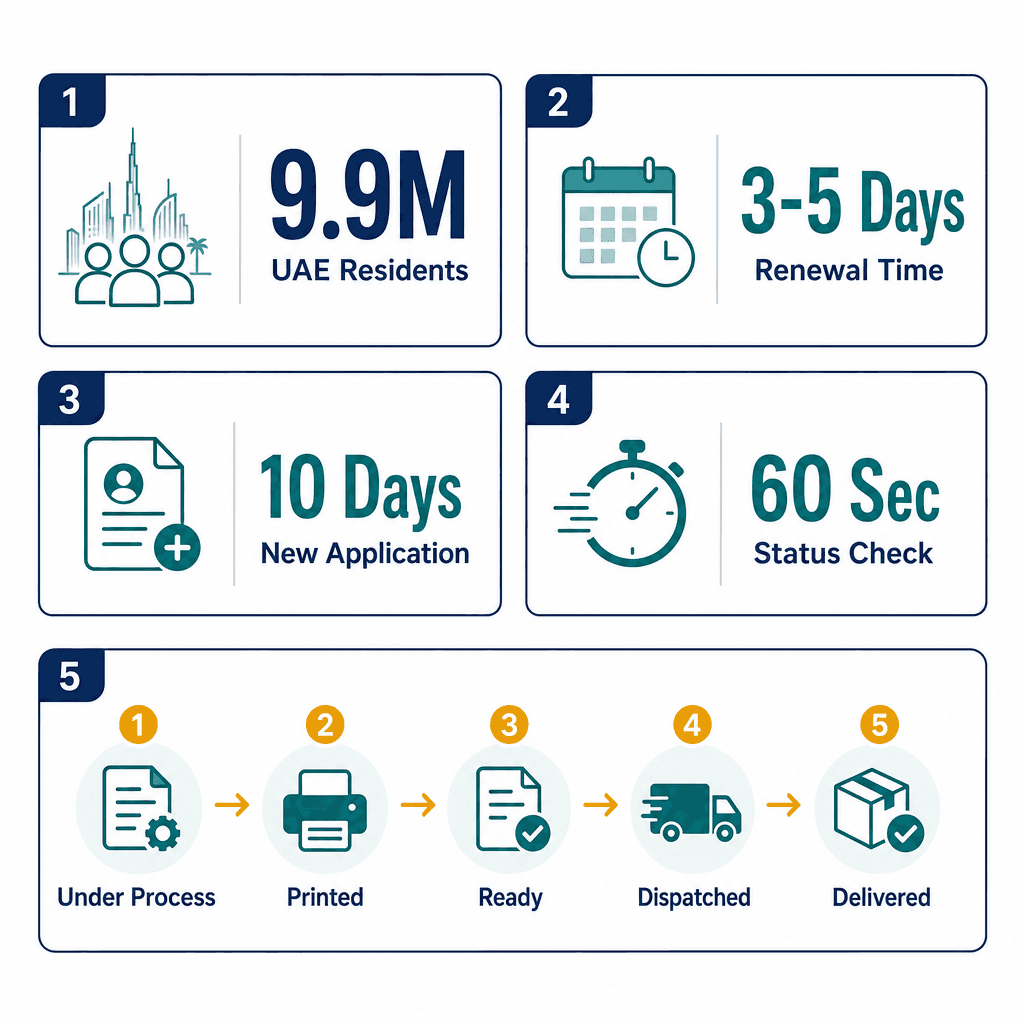
The ICP system uses five distinct status stages: Under Process, Printed, Ready for Collection, Dispatched, and Delivered. Knowing what each label means lets you plan around the delivery window instead of reacting to delays.
Know the Processing Timelines in Advance
Renewals typically take 3-5 working days from biometric submission, while new applications can take up to 10 working days through to card delivery. A status change from Printed to Dispatched usually occurs within 1-2 additional working days.
Use the ICP Smart App or Helpline as Backup
Beyond the portal, you can track your Emirates ID status through the ICP Smart App or by calling the ICP helpline on 600 522222. These alternatives are useful if you have trouble accessing the website or need to check on someone else's behalf.
Arrange Delivery When Status Shows Dispatched
Once your status updates to Dispatched, Emirates Post handles the final delivery to your registered UAE address. Being home at that point avoids a missed delivery and the wait for a second attempt.
Avoid Unnecessary Office Visits with Online Tracking
Real-time status tracking eliminates the need to visit an ICP office or contact your typing centre to check progress. The portal gives you instant answers that previously required an in-person trip or phone call.
Consider Professional Help for Complex Applications
Free zone residency service providers can manage Emirates ID applications, renewals, and ICP portal tracking on your behalf. This is especially useful for employers or PRO teams handling multiple applications simultaneously.
In 2026, the Federal Authority for Identity, Citizenship, Customs and Port Security (ICP) manages Emirates ID records for over 9.9 million UAE residents and expatriates. Average Emirates ID renewal processing time is 3-5 working days from biometric submission. New applications take up to 10 working days from submission to card delivery. The ICP Smart Services portal at icp.gov.ae processes status inquiries around the clock, 365 days a year, in both English and Arabic.
Checking your Emirates ID status takes under 60 seconds via the ICP Smart Services portal at icp.gov.ae, enter your application number, Emirates ID number, or passport number plus date of birth, and the Federal Authority for Identity, Citizenship, Customs and Port Security returns your real-time UAE ID card status instantly. This guide covers every method to check Emirates ID status, explains each status label in plain language, and tells you exactly what to do at every stage.
Need help managing the whole process? Dubai South Business Hub Free Zone residency services handles Emirates ID applications, renewals, and ICP portal tracking on your behalf. For more detail, see our guide on UAE Emirates ID card complete guide.
Emirates ID Application Status - What It Means
Emirates ID application status is a real-time indicator displayed on the ICP Smart Services portal at icp.gov.ae showing exactly where your card is in the production and delivery pipeline, from initial submission through printing, dispatch, and final delivery to your registered UAE address. Your Emirates ID must be ready before you can open a business bank account or complete your company setup at Dubai South Business Hub Free Zone.
What the ICP Application Tracking System Records
The ICP tracks every Emirates ID application from the moment biometrics are submitted at an approved typing centre. The system records five distinct status stages: Under Process, Printed, Ready for Collection, Dispatched, and Delivered. You can check Emirates ID application status at any point using the portal, the ICP Smart App, or by calling the ICP helpline on 600 522222.
Status updates happen in real time. A change from "Printed" to "Dispatched" typically occurs within 1-2 working days. Both English and Arabic status labels are available on icp.gov.ae, which matters if your employer's PRO team is tracking the application on your behalf in Arabic.
Take a Dubai-based expat who submitted a renewal at an ICP-approved typing centre in Business Bay. They can realistically see their UAE ID card status change from "Under Process" to "Printed" within 3 working days, then "Dispatched" within 2 working days after that, with Emirates Post delivery completing the cycle.
Why Tracking Your Emirates ID Status Matters
Your Emirates ID is required for bank account access, hospital registration, tenancy contracts, and virtually every government service transaction in the UAE. A lapsed or undelivered card creates real friction fast. Knowing how to check my Emirates ID status means you can plan around the delivery window instead of reacting to it.
Status tracking also prevents unnecessary trips. You don't need to visit an ICP office or call your typing centre to find out if the card is ready. The portal tells you instantly. And if the status shows "Dispatched," you can arrange to be home for Emirates Post delivery rather than missing it and waiting for a second attempt.
How to Check Emirates ID Status via ICP Portal - Step by Step
To check your Emirates ID status online, go to icp.gov.ae, select "ICP Smart Services", click "Inquiries", then "Emirates ID Status", and enter your application number or Emirates ID number. The Federal Authority for Identity, Citizenship, Customs and Port Security portal returns your real-time status in under 60 seconds. For a broader overview of ICP services, see this ICP smart services UAE immigration portal guide.
Step-by-Step: ICP Portal Status Check
An Abu Dhabi resident who applied for a new Emirates ID enters their application number from the typing centre receipt and sees "Under Process", confirming biometrics have been received and ICP production has started. No further action is needed at that point.
What Information You Need Before You Check
You only need one of three inputs to retrieve your status on icp.gov.ae:
All three inputs return identical status information. The choice of input doesn't affect what the portal shows you.
How do I check Emirates ID application status online?
Go to icp.gov.ae, select "ICP Smart Services", click "Inquiries", then "Emirates ID Status". Enter your application number, 15-digit Emirates ID number, or passport number with date of birth. The Federal Authority for Identity, Citizenship, Customs and Port Security portal displays your real-time status in under 60 seconds, available 24/7 in English and Arabic at no charge.
How to Check Emirates ID Status Using Passport Number
To check your Emirates ID status with your passport number, go to icp.gov.ae, select "Emirates ID Status" under Inquiries, choose "Passport Number" as the input type, enter your passport number and date of birth, then click Search. The Federal Authority for Identity, Citizenship, Customs and Port Security returns your real-time status instantly.
Step-by-Step: Passport Number Status Check on icp.gov.ae
A Sharjah-based employee whose employer submitted their renewal application can enter their passport number on icp.gov.ae and confirm status "Printed" without needing to contact HR or wait for a reference number. The passport number plus date of birth combination is a fully accepted status check input.
When to Use Passport Number Instead of Application Number
Use your passport number when you didn't receive your typing centre receipt, or when your employer's PRO office submitted the application and hasn't shared the reference number. It's the most universally accessible input because every applicant has their passport to hand.
Use your Emirates ID number instead if you're renewing and your existing card is still valid. For first-time applicants who have never held an Emirates ID, the passport number plus date of birth is the only viable alternative to the application number.
How to Track Emirates ID Using the ICP Smart App
To track your Emirates ID using the ICP Smart App, download the app free from the Apple App Store or Google Play Store, log in with your UAE Pass or create an ICP account, tap "Inquiries", then "Emirates ID Status", and enter your application or ID number. The app shows real-time Emirates ID application tracking status and sends push notifications when your status changes.
Step-by-Step: Tracking via ICP Smart App
A Dubai Marina resident who enabled push notifications on the ICP Smart App received an alert at 9:14 AM on a Tuesday confirming their card status changed to "Dispatched", giving them one day's notice to arrange receipt of the Emirates Post delivery.
ICP Smart App vs ICP Portal: Which Should You Use?
Feature | ICP Smart App | icp.gov.ae Portal |
|---|---|---|
Push Notifications | Yes, automatic alerts on status change | No, manual check required each time |
Download Required | Yes, App Store or Google Play | No, browser-based, instant access |
Login Needed | Yes, UAE Pass or ICP account | No, enter details directly |
Best For | Ongoing tracking across multiple applications | Quick one-time status check |
Language Options | English and Arabic | English and Arabic |
Both channels return identical status data from the same ICP database. The app wins for ongoing tracking; the portal wins for a fast one-off check without installing anything.
Emirates ID Status Types and What Each One Means
Emirates ID status types are: Under Process (application received, production not started), Printed (card produced at ICP facility), Ready for Collection (card at typing centre), Dispatched (handed to Emirates Post for delivery), and Delivered (card received at your registered address). Each stage has a defined next action for you.
Emirates ID Status Types, Meanings and Next Actions (2026)
Status Label | What It Means | Your Next Action | Typical Timeframe |
|---|---|---|---|
Under Process | Application and biometrics received, production queue | No action needed, wait for update | 3-5 days (renewal) / up to 10 days (new) |
Printed | Card produced at ICP printing facility | No action, dispatch follows in 1-2 working days | 1-2 working days to dispatch |
Ready for Collection | Card held at your designated typing centre | Visit typing centre with original passport | Collect within 30 days |
Dispatched | Emirates Post has card in delivery network | Stay available at registered address | 1-3 working days |
Delivered | Card delivered to registered UAE address | Check reception or building mailroom | Completed |
Key Considerations for Emirates ID Delivery Status
Emirates ID "ready for collection" means the card is physically at your designated typing centre, bring your original passport, not a copy.
Emirates ID delivery status changes to "Dispatched" before Emirates Post contacts you, check icp.gov.ae first so you're not caught off guard.
If Emirates Post fails delivery twice, the card returns to the typing centre. Check icp.gov.ae for the updated collection location.
The "Ready for Collection" window is 30 days. After that, the card may be returned to ICP and a re-issue fee could apply.
How Long Does Emirates ID Take to Be Ready
Emirates ID renewal takes 3-5 working days from biometric submission to card printing. New Emirates ID applications take up to 10 working days. Once printed, the card is dispatched within 1-2 working days via Emirates Post. Total time from application to delivery is typically 5-7 working days for renewals, use the Emirates ID status check online at icp.gov.ae to track every stage.
Processing Timelines by Application Type
A Fujairah-based teacher who submitted renewal biometrics on a Monday at an ICP typing centre can realistically expect delivery by the following Wednesday, 9 calendar days including the weekend.
Factors That Affect Emirates ID Processing Time
High application volumes during UAE visa amnesty periods or year-end renewal cycles can add 2-3 working days to standard timelines. If your fingerprint quality was flagged as poor at the typing centre, ICP sends a re-submission notice by SMS and the clock restarts, adding another 3-5 days.
UAE public holidays pause ICP processing entirely. Build these into your estimates, especially around Eid periods when processing can stop for 4-5 consecutive days. Applications submitted via employer PRO services follow the same ICP timeline as individual direct applications, there's no priority queue for employer-sponsored submissions.
Emirates ID Card Printed Is Done - What to Do Next
"Emirates ID card printed is done" means your card has been produced at the ICP printing facility and is queued for dispatch. No action is needed from you at this stage. The Federal Authority for Identity, Citizenship, Customs and Port Security will dispatch the card to Emirates Post within 1-2 working days, at which point your Emirates ID card status updates to "Dispatched".
What to Do When Status Shows Ready for Collection or Delivered
A Deira resident received an ICP SMS at 8:45 AM confirming "Dispatched" status. They tracked the Emirates Post shipment using the reference number in the SMS and arranged to be home the following afternoon, card delivered on the first attempt.
For a complete walkthrough of ICP services, the ICP smart services UAE immigration portal guide covers
Citations
Federal Authority for Identity, Citizenship, Customs and Port Security.. icp.gov.ae. ICP UAE, 2024.
Ministry of Human Resources and Emiratisation.. mohre.gov.ae. MoHRE UAE, 2024.
Dubai Economy and Tourism.. dubaidet.gov.ae. DET Dubai, 2024.
General Directorate of Residency and Foreigners Affairs Dubai.. gdrfad.gov.ae. GDRFA Dubai, 2024.
UAE Cabinet.. uaecabinet.ae. UAE Cabinet, 2023.
Frequently Asked Questions