
Topic Summary
Check WPS Status in Under Two Minutes
Employers can verify their company's WPS compliance status directly on mohre.gov.ae using their MOL ID. The result instantly shows whether the establishment is Compliant, Non-Compliant, or Under Investigation.
15-Day Late Payment Triggers Automatic Ban
Paying salaries 15 or more days after the due date automatically flags a Level 1 violation and applies a work permit ban within 24 hours. This threshold is the single most critical deadline UAE employers must track each payroll cycle.
Your MOL ID Is the Key to WPS Access
The MOL ID is assigned automatically when an employer registers with MOHRE and receives their establishment card. It links every employee's salary data to one centralized WPS compliance record on the MOHRE portal.
No Minimum Headcount for WPS Obligations
Every mainland private sector employer, even those with just one worker, must be fully enrolled in WPS with no exceptions. Free zone companies face equivalent requirements enforced by their respective free zone authority.
Non-Compliance Blocks All New Work Permits
A Non-Compliant WPS status immediately freezes all new work permit applications and renewals through MOHRE. Employers must clear overdue salaries and submit a formal removal request before access is restored, which can take up to three working days.
Under Investigation Status Means a Longer Freeze
Companies flagged as Under Investigation face permit freezes lasting 7 to 21 working days while MOHRE conducts a formal review. This status carries greater operational risk than a standard Non-Compliant flag and requires proactive engagement with MOHRE.
12,400 Employers Penalized in Q1 2026 Alone
MOHRE issued enforcement actions against 12,400 employers in the first quarter of 2026 for late salary payments, reflecting aggressive oversight across the UAE's 450,000-plus registered private sector establishments. Staying ahead of WPS deadlines is no longer optional for any employer operating in the country.
In 2026, over 450,000 private sector establishments across the UAE are registered under the Wage Protection System. MOHRE issued enforcement actions against 12,400 employers in Q1 2026 alone for late salary payments. The UAE Cabinet mandates 100% WPS coverage for all mainland and free zone employers with one or more workers (UAE Cabinet, 2024). A salary paid even 15 days late triggers an immediate work permit ban. This guide covers every method to run a WPS status check UAE, locate your MOL ID, and resolve violations before they escalate, updated for 2026.
1. What This Guide Covers
What Is WPS Status and Why It Matters
What Is MOL ID for WPS and How to Get It
How to Check Your Company WPS Status - Step by Step All UAE businesses registered through Dubai South Business Hub Free Zone must enrol in WPS to remain MOHRE-compliant when paying employees.
How Employees Can Verify Their WPS Salary Was Paid
WPS Status Categories and What They Mean
WPS Violation Penalties in AED - 2026
Knowing how to check the WPS status of your company takes under two minutes on mohre.gov.ae. The result tells you exactly whether your establishment is Compliant, Non-Compliant, or Under Investigation, and what it means for your ability to hire. For a full background on the system itself, read our wage protection system UAE complete guide before continuing.
2. What Is WPS Status and Why It Matters
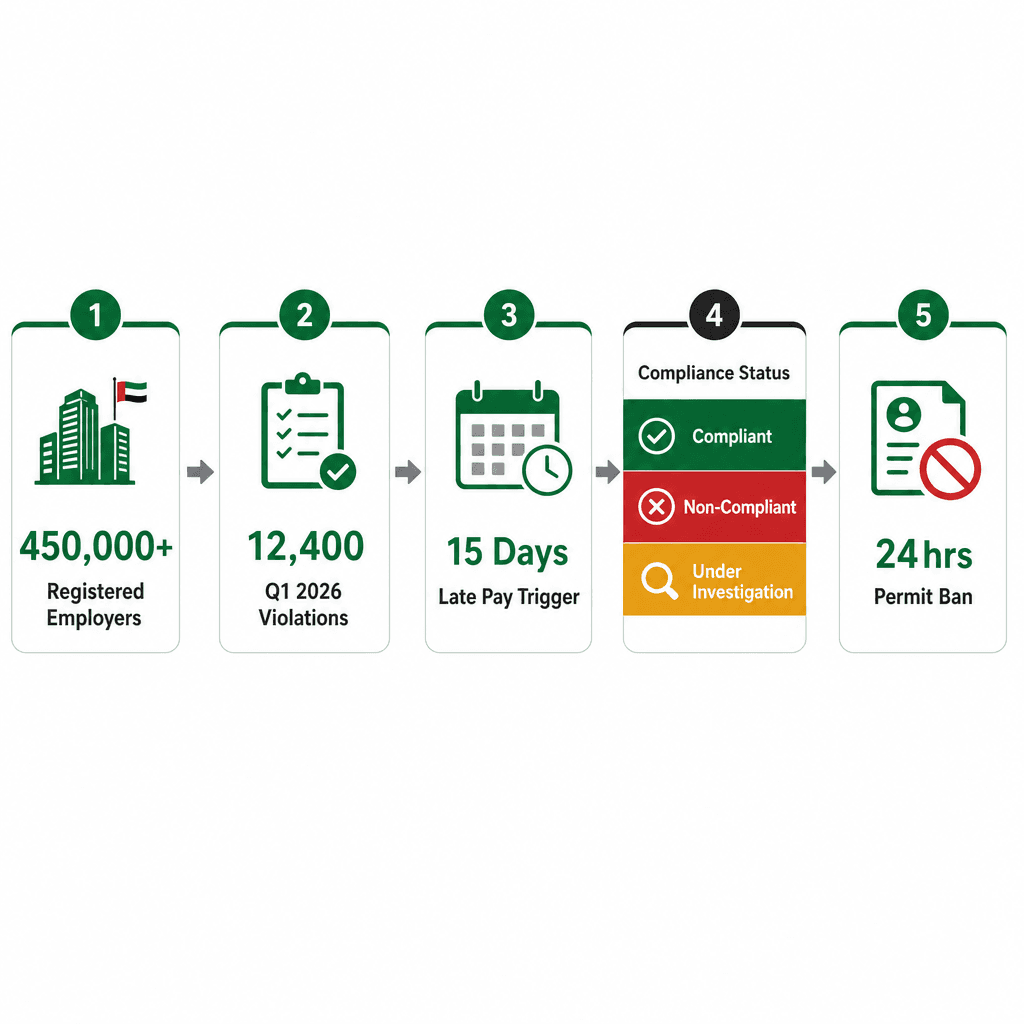
WPS status is a compliance classification assigned by MOHRE to every registered UAE employer, showing whether salary payments have been made on time through an approved Wage Protection System agent. The status displays as Compliant, Non-Compliant, or Under Investigation and directly controls your company's ability to issue new work permits.
How WPS Status Affects Your Work Permit Access
A Non-Compliant WPS status immediately blocks all new work permit applications through MOHRE. Employers cannot hire or renew permits until the violation is cleared. MOHRE links wage protection system status directly to the employer's MOL ID, so every transaction on the portal reflects live compliance standing.
The 15-day threshold is the critical trigger. Pay salaries 15 or more days after the due date and the system automatically flags a Level 1 violation, applying a work permit ban within 24 hours. Companies flagged Under Investigation face permit freezes for 7 to 21 working days pending a formal MOHRE review.
Here's a real scenario that illustrates the stakes. A Dubai mainland trading company with 12 employees paid salaries 18 days late in January 2026. Their WPS status flipped to Non-Compliant within 24 hours, blocking three pending work permit renewals. The company had to pay the overdue salaries, submit a removal request via mohre.gov.ae, and wait 3 working days before access was restored.
Which Employers Must Be WPS-Registered
All mainland private sector employers registered with MOHRE must enrol in WPS. There is no minimum headcount threshold, a company with a single employee is fully subject to the same obligations as one with 500.
Free zone companies are subject to WPS requirements enforced by their respective free zone authority. Dubai South Business Hub Free Zone enforces full WPS compliance for all licensed employers, applying both MOHRE and free zone authority oversight. Domestic workers hired under MOHRE contracts are covered under the 2017 Domestic Workers Law. Government and public sector entities are exempt from MOHRE WPS but operate under separate payroll compliance frameworks.
3. What Is MOL ID for WPS and How to Get It
The MOL ID for WPS is the Ministry of Labour identification number assigned automatically to every employer when they register with MOHRE and receive their establishment card. It is the unique reference number used to log into the MOHRE portal, check WPS status, and file all employer transactions including work permit applications.
Where to Find Your MOL ID
How MOL ID Links to Your WPS Account
MOHRE uses the MOL ID to map every employee under your establishment to a single WPS compliance record. All salary upload data from your WPS agent is reconciled against this ID. When you submit payroll data through an approved WPS agent (a bank or exchange house), the agent files the SIF file (Salary Information File) referencing your MOL ID. This triggers the MOHRE system to update your wage protection system status in real time.
Over 90 approved WPS agents operate in the UAE as of 2026, including First Abu Dhabi Bank, Emirates NBD, and Al Ansari Exchange. If your MOL ID is incorrectly linked to a closed or suspended license, WPS uploads will fail. Contact MOHRE on 800 60 or visit a Tasheel centre to correct the record before your next payroll cycle. For a broader guide to MOHRE services, see our MOHRE inquiry system UAE guide.
4. How to Check Your Company WPS Status - Step by Step
To check your company WPS status, log into mohre.gov.ae, select the WPS section, enter your MOL ID, and view your live compliance classification. The process takes under two minutes and shows your current status as Compliant, Non-Compliant, or Under Investigation with the date of last salary file submission.
Step-by-Step: WPS Status Check via MOHRE Portal
The portal is available 24/7. Employers can also access the Tasheel online portal at tas.mohre.gov.ae for the same WPS enquiry function. One employer I've seen use this process was opening a new corporate account with a UAE bank, the compliance screenshot from mohre.gov.ae was accepted as sufficient proof of WPS standing, avoiding a full MOHRE letter request.
How to Check WPS Status by Company Number via MOHRE Smart App
Keep your company compliance calendar UAE aligned with your WPS check schedule. Monthly checks take less than five minutes and catch issues before they become violations.
5. How Employees Can Verify Their WPS Salary Was Paid
Employees can verify their WPS salary was paid by checking the MOHRE Smart App under 'My Salary', which shows the exact date and amount of each WPS-registered payment. They can also request a WPS salary certificate from their employer or call MOHRE on 800 60 to confirm payment status by Emirates ID.
How to Use the MOHRE Smart App to Check Salary Payment
Salary records in the app are updated within 48 hours of SIF file confirmation by the WPS agent. An employee in Dubai who used this process in March 2026 confirmed their salary had been processed correctly on time, the app showed the exact transfer date and the agent name, which they used to resolve a payslip discrepancy with their employer the same day.
Requesting a WPS Salary Certificate from Your Employer
A WPS salary certificate is a printed or digital MOHRE-generated document showing all salary payments made for a specific employee under the employer's WPS account. Employees are legally entitled to request this document. Employers must provide it within 3 working days under UAE Labour Law, this is not discretionary.
The certificate is commonly required for bank loan applications, visa renewals, and tenancy contract renewals in Dubai and Abu Dhabi. Emirates NBD, for instance, accepts the WPS salary certificate as primary proof of income for home loan applications. If the employer refuses to issue the certificate, contact MOHRE on 800 60 or submit a request via mohre.gov.ae under Employee Services. For further MOHRE process guidance, see our MOHRE inquiry system UAE guide.
6. WPS Status Categories and What They Mean
MOHRE assigns three WPS status categories to UAE employers: Compliant means all salaries were paid on time through an approved agent; Non-Compliant means a payment was late or incorrect, triggering a work permit ban; Under Investigation means MOHRE is auditing the account and all permit transactions are frozen pending review.
Compliant Status - What It Means and How to Maintain It
Compliant status means MOHRE has received and accepted a valid SIF file for the current salary cycle, with payment confirmed by the approved WPS agent. To maintain it, salary must be paid no later than 15 days after the last working day of the month, this is the statutory deadline under UAE Labour Law.
Worth flagging: direct bank transfers to employee accounts that bypass the SIF system do not count as WPS-compliant payments, even if the amount is correct. The payment must flow through a MOHRE-approved WPS agent. First Abu Dhabi Bank, for example, offers an integrated WPS payroll service that submits the SIF file automatically on the same day as salary processing, keeping employers continuously Compliant with no manual intervention.
Non-Compliant and Under Investigation - Immediate Actions Required
Non-Compliant status is triggered when salary is paid 15 or more days late, paid in the wrong amount, or processed outside the approved WPS channel. Under Investigation status is applied when MOHRE suspects systematic wage violations. This status cannot be self-resolved, it requires a formal MOHRE hearing and can take 7 to 21 working days to resolve.
Both statuses freeze all outgoing MOHRE transactions. No new work permits, no renewals, no labour card amendments, until the status is cleared. A construction company was placed Under Investigation in early 2026 after multiple employees filed simultaneous wage complaints via the MOHRE Smart App. The company's 47 active work permits were frozen for 14 working days while MOHRE conducted its review. Don't wait for MOHRE to contact you. Log into mohre.gov.ae immediately to view the specific violation detail and start the resolution process. For a deeper look at the system, read our wage protection system UAE complete guide.
7. WPS Violation Penalties in AED - 2026
WPS violation penalties in 2026 range from a work permit ban at Level 1 (15+ days late) to an AED 50,000 fine at Level 2 (30+ days late) and company blacklisting at Level 3. Penalties are enforced by MOHRE and escalate with each repeated or prolonged non-payment cycle.
WPS Violation Level Table - Triggers, Fines, and Resolution
WPS Violation Levels - Triggers, Penalties, and Resolution Steps 2026
Violation Level | Trigger | Penalty | How to Resolve |
|---|---|---|---|
Level 1 | Salary paid 15–29 days late | Immediate new work permit ban | Pay overdue salaries via approved WPS agent; submit removal request at mohre.gov.ae |
Level 2 | Salary paid 30+ days late | AED 50,000 fine + work permit ban | Pay overdue salaries; pay fine via mohre.gov.ae/payments; submit clearance request |
Level 3 | Repeated or systematic non-payment | Company blacklisting; all permits cancelled; possible criminal referral | MOHRE legal department hearing required; full salary settlement mandatory before reinstatement |
One important detail that surprises many employers: fines are assessed per violation cycle, not per employee. A hospitality company with 50 employees that paid salaries 35 days late in 2026 incurred one Level 2 fine of AED 50,000, not 50 individual fines. That said, if the violation recurs in the following month, a second fine cycle begins immediately.
How WPS Fines Are Collected by MOHRE
MOHRE issues fines electronically. They appear as outstanding payments in your employer account on mohre.gov.ae and must be settled before any services are reinstated. Fines can be paid online via the MOHRE payment portal at mohre.gov.ae/payments using a UAE-registered credit or debit card, or in person at any Tasheel service centre.
MOHRE does not issue grace periods. The system is automated and penalties apply from the day the threshold is crossed. Unpaid fines accumulate and can be referred to the UAE courts for enforcement, at that stage, the company owner's personal liability may be engaged depending on the company structure. One employer resolved a Level 2 fine of AED 50,000 via the online payment portal and had work permit access restored the same day. Keep your company compliance calendar UAE updated to prevent reaching this point.
What triggers a WPS violation check by MOHRE?
MOHRE runs automated WPS violation checks daily against all registered employer accounts. A violation is triggered when the SIF file is not received within 15 days of the salary due date, when the payment amount does not match the contracted salary, or when salary is processed outside an approved WPS agent. Employee complaints filed via the MOHRE Smart App also initiate a targeted compliance review of the employer's account within one working day.
8. How to Fix a WPS Non-Compliance Status
To fix a WPS non-compliance status, pay all overdue salaries immediately through your approved WPS agent, then log into mohre.gov.ae and submit a violation removal request with proof of payment. MOHRE updates the status to Compliant within 2 to 5 working days once the salary file and removal request are both confirmed.
Step-by-Step: Removing a WPS Violation from Your Record
A retail company in Dubai cleared a Level 1 violation in 3 working days using this exact process in Q1 2026. They paid the overdue salaries on a Monday morning, submitted the removal request with the SIF reference by noon, and received MOHRE's Compliant confirmation by Thursday. The key was having the SIF reference number ready, without it, the removal request is incomplete and the review clock doesn't start.
Preventing WPS Violations with a Compliance Calendar
Set a recurring internal payroll deadline 5 days before the MOHRE 15-day limit. This gives your WPS agent processing time and prevents accidental late submissions caused by bank delays or public holidays. An HR manager who sets a calendar reminder 10 days before month end, triggering payroll processing on day 20 of the month, effectively removes the risk of a Level 1 violation entirely.
Use the MOHRE Smart App notification feature to receive push alerts when SIF files are due or when a status change is detected. Appoint a dedicated HR or finance team member as the WPS compliance owner, one person with direct access to the MOHRE portal and the WPS agent contact. Review your company compliance calendar UAE to align WPS payroll dates with other MOHRE and free zone renewal deadlines, avoiding cash flow conflicts that cause late payments.
How Dubai South Business Hub Free Zone Helps
Dubai South Business Hub Free Zone companies with employees must register for WPS through MOHRE and their free zone authority. The Beyond Hub business support team handles MOHRE WPS registration, establishment card processing, and ongoing compliance monitoring on behalf of Dubai South Business Hub Free Zone license holders, removing the administrative burden from the employer.
WPS Registration and Compliance Support Through Beyond Hub
Dubai South Business Hub Free Zone companies with one or more employees are required to register for WPS. This is enforced by both MOHRE and the Dubai South Free Zone Authority simultaneously. The Beyond Hub business support team registers new companies on WPS, obtains the MOL ID, and connects the employer with an approved WPS agent as part of the standard onboarding process.
A new Dubai South Business Hub Free Zone license holder completed full WPS setup in 5 working days through Beyond Hub in 2026, without visiting a single Tasheel centre. Beyond Hub also provides monthly WPS status monitoring, alerting clients before a payment deadline is missed rather than
Citations
Ministry of Human Resources and Emiratisation.. mohre.gov.ae. MOHRE UAE, 2024.
Federal Authority for Identity, Citizenship, Customs and Port Security.. icp.gov.ae. ICP UAE, 2024.
UAE Cabinet.. uaecabinet.ae. UAE Cabinet, 2023.
Dubai Economy and Tourism.. dubaidet.gov.ae. DET Dubai, 2024.
UAE Ministry of Economy and Tourism.. moet.gov.ae. MOET UAE, 2024.
Frequently Asked Questions