
Topic Summary
e-Channel Is Not a Public Portal
The e-Channel system is a secure B2B portal restricted to authorised entities like employers, free zones, and PRO officers. Individual employees cannot submit or manage visa transactions through it — that access belongs to the ICA Smart Services app instead.
It Covers All Seven Emirates, Not Just Dubai
e-Channel is operated by ICA at the federal level and routes transactions to the relevant authority in each emirate. A submission from an Abu Dhabi free zone, for example, goes to ICA's Abu Dhabi queue, not GDRFA Dubai.
Every Transaction Gets a Unique Reference Number
When an employer submits a visa application through e-Channel, the system assigns a unique transaction reference number for tracking. PRO officers monitor this number until ICA confirms approval.
Processing Takes 2–5 Working Days When Done Right
Entry permits submitted through e-Channel typically process in 2 to 5 working days, provided documents are complete and the establishment card is active. Errors in documentation are a leading cause of returned or delayed submissions.
Entry Permits Have a Strict 60-Day Validity Window
Once an entry permit is issued through e-Channel, it is valid for only 60 days. Employers and PRO officers need to track issuance dates carefully to avoid permits expiring before the employee travels.
Batch Submissions Save Time for Larger Teams
A mainland company with multiple employees can submit all residency renewal applications in a single batch through e-Channel. This makes the portal especially valuable for HR teams managing high volumes of visa transactions.
'In e-Channel' Does Not Mean Approved
When a PRO says a case is 'in e-Channel,' it means the application has been submitted but not yet actioned by ICA. It has not reached GDRFA processing status, so employers should not treat this stage as confirmation of progress.
By Editorial Team, UAE business setup and immigration compliance specialists with direct experience supporting free zone and mainland visa operations. Full bio →
The UAE processes over 3.5 million active work and residency visas annually through its government immigration infrastructure (ICP UAE, 2025). Most employers only discover how the e channel uae system actually works after something goes wrong: an application stuck in processing, a status code that won't update, or a new hire's entry permit sitting in a queue with no explanation. Entry permits for employment visas carry a 60-day validity window from issuance. Document errors cause a significant share of returned submissions. GDRFA Dubai alone handles over 1.2 million residency transactions each year (GDRFA Dubai, 2024). And yet the e channel uae portal itself remains largely invisible to the founders and HR managers who depend on it most. For more detail, see our guide on checking work permit status online. For more detail, see our guide on how to apply for a UAE work visa.
This guide explains exactly what the e channel uae system is, who accesses it, which visa transactions run through it, how to track status step by step, and what to do when something goes wrong, so you're not learning it under pressure.
What Is the e-Channel System in the UAE?
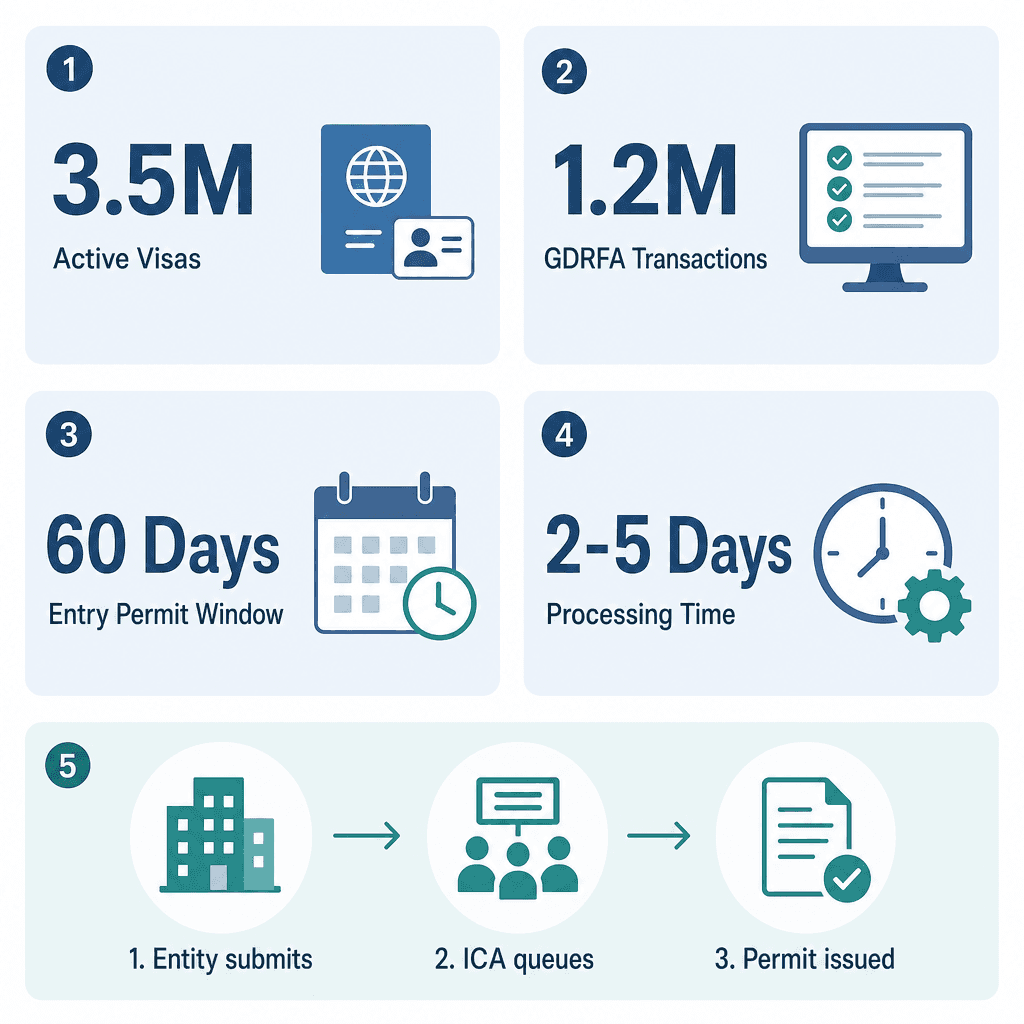
The e-Channel system in the UAE is a secure, web-based immigration portal operated under ICA that allows authorised entities, employers, free zones, typing centres, and PRO officers, to submit, manage, and track visa and residency transactions on behalf of their sponsored employees and dependants. Employers who set up their business through Dubai South Business Hub Free Zone can use e-Channel to process all employee visas online.
The Official Definition and Purpose of e-Channel
e-Channel is operated by the Federal Authority for Identity, Citizenship, Customs and Port Security (ICA). It is not a Dubai-specific tool. It covers all seven emirates and serves as the single authorised gateway for employer-side immigration submissions across the country.
The system's core function is to act as the intermediary layer between sponsoring entities and the ICA immigration database. Every visa transaction, entry permit, residency renewal, cancellation, is logged, queued, and tracked here before any physical document is issued. ICA introduced e-Channel as part of the UAE's broader Smart Government initiative, replacing paper-based and in-person submission processes that previously required physical visits to immigration offices.
In practice, average processing times for entry permits via e-Channel run 2 to 5 working days when documents are complete and the establishment card is active. A mainland company in Dubai with 20 employees, for example, can submit all residency renewal applications in a single batch. Each application receives a unique transaction reference number that the PRO officer monitors until ICA approval is confirmed.
How e-Channel Differs from the ICA Smart Services App and GDRFA
Here's a distinction that trips up a lot of employers. The ICA Smart Services app (available to the public on iOS and Android) lets individuals check visa status. e-Channel is the back-end B2B portal used by entities with an active establishment card or free zone authorisation. One is a read-only window; the other is the submission engine.
ICA Smart Services: Public-facing, individual access, read-only visa status checks.
e-Channel portal: Entity-access only, submission and management of all employer-side visa transactions.
GDRFA Dubai: The Dubai-specific enforcement authority. e-Channel feeds data into GDRFA for Dubai-based transactions, but routes to equivalent authorities in Abu Dhabi and other emirates for submissions outside Dubai.
If your PRO tells you a case is "in e-Channel," it means the application has been submitted but not yet actioned by ICA. It has not yet reached GDRFA processing status. An Abu Dhabi free zone company submitting a new entry permit through e-Channel, for instance, will see the transaction route to ICA's Abu Dhabi queue, not GDRFA Dubai, even though the portal interface looks identical.
Free zones receive their own e-Channel credentials tied to their establishment card number. Companies licensed through Dubai South Business Hub don't need to register separately, the free zone submits on their behalf, a structural advantage over mainland setups where the company itself must maintain active e-Channel access. Learn more about Dubai employment visa requirements if you're planning your first hire.
Who Uses e-Channel and Why
e-Channel is used by employers, PRO officers, free zone authority administrators, and licensed typing centres. Each user type holds credentials tied to a specific establishment card or authorisation code. Individual employees and visa applicants do not have direct access, all submissions are made on their behalf by the sponsoring entity. For more detail, see our guide on sponsoring employees through E-Channel.
Employers and PRO Officers: The Primary Users
Any company with an active establishment card, mainland or free zone, can register for e-Channel access. That access is tied directly to the card number and must be renewed when the establishment card is renewed. A lapsed establishment card suspends e-Channel access immediately, freezing all pending transactions until renewal is complete.
PRO officers (Public Relations Officers) are the day-to-day operators. They log in, upload documents, pay fees, and monitor status for each employee transaction. Large employers often assign multiple PRO logins under a single establishment card to handle volume, each login carries its own audit trail, which matters for compliance and dispute resolution.
A logistics company in Jebel Ali with 150 employees, for example, might assign two PRO officers to e-Channel: one handling new entry permits, the other managing renewals and cancellations. That split keeps the queue moving without bottlenecks and ensures no single person is a point of failure in the visa pipeline.
Build Your Team Through Free Zones and Typing Centres
Free zone authorities like Dubai South Business Hub act as the registered e-Channel entity for all companies licensed under them. The free zone's credentials are used, not the individual company's. This is why founders setting up through a free zone don't need to register for e-Channel independently, the free zone's PRO team handles all submissions on their behalf.
Typing centres are ICA-approved third-party agents with their own e-Channel credentials, typically used by individuals or small businesses without a dedicated PRO officer. Over 400 licensed typing centres operate across the UAE with active e-Channel credentials. Each submission is tagged with the centre's agent code, creating a traceable record if a dispute arises.
A startup founder licensed through Dubai South Business Hub who wants to hire two overseas employees simply submits the request to Dubai South Business Hub Free Zone's PRO team. That team logs into e-Channel, submits both entry permit applications under the free zone's establishment card, and sends the founder transaction reference numbers within 24 hours. The founder never touches the portal. Explore Dubai South Business Hub Free Zone residency and PRO services to see how this works in practice.
What Visa Transactions Go Through e-Channel?
All major employment and residency visa transactions in the UAE are processed through e-Channel, including new entry permits, change of status applications, residency visa stamping, renewals, and cancellations. Medical fitness requests and Emirates ID linking also pass through the system before ICA issues final approvals.
Entry Permits, Status Changes, and Residency Stamps
New entry permit: Submitted for overseas hires before they travel to the UAE. This is the first transaction for any employee joining from abroad. Entry permit validity is typically 60 days from issuance.
Change of status: Used when someone already in the UAE on a visit visa converts to a residency visa without leaving the country. A company hiring a marketing manager currently on a 30-day visit visa can submit a change of status through e-Channel, avoiding the cost and delay of the employee flying out for an entry permit.
Residency visa stamping: After medical fitness and Emirates ID biometrics are completed, the final residency stamp is applied through an e-Channel-linked transaction. This is the step that activates the employee's legal residency in the UAE.
Renewals, Cancellations, and Special Categories
Renewals: Must be submitted before the current visa expires. e-Channel allows submission up to 30 days in advance without overstay risk.
Cancellations: Mandatory when an employee leaves the company. The employer submits a cancellation through e-Channel, which triggers the employee's 30-day grace period to transfer sponsorship or depart. Failure to cancel a departed employee's visa can result in fines for the sponsoring entity.
Mission visas, investor visas, and dependent visas (spouse, children) all run through e-Channel under the same establishment card as employment visas.
Golden Visa applications for qualifying professionals also use e-Channel as the submission gateway before routing to ICA's dedicated long-term residency processing team.
When a tech firm's senior developer resigns, the PRO officer submits a cancellation through e-Channel the same day. The system logs the cancellation date, starts the 30-day grace period clock, and updates the employee's ICA record automatically, no manual follow-up required. See our guide on how to apply for a work visa in Dubai for the full sequence from offer letter to residency stamp.
How to Check Your Visa Status Through e-Channel, Step by Step
To check visa status through e-Channel, log into the ICA e-Channel portal with your establishment credentials, navigate to the transaction history for the relevant employee, and locate the current status code against the application reference number. Status codes update in real time as ICA processes each stage of the application.
Step 1: Log In and Locate the Transaction
The portal is accessible 24 hours a day, 7 days a week. Processing queues, though, are worked during official UAE government hours, so a submission made Thursday evening may not show a status change until Sunday morning (the UAE working week runs Sunday through Thursday).
Step 2: Read the Status Codes Correctly
"Under Process" / "In Progress": Application received. ICA is reviewing. No action needed unless it exceeds the 2–5 working day window.
"Entry Permit Approved": The permit is issued. The employee can travel to the UAE using the reference number. This is NOT the residency visa. Steps 3 and 4 of the process above still remain.
"Returned" / "Rejected": Sent back due to a document issue or eligibility flag. Read the rejection reason precisely, correct only the flagged field, then resubmit.
"Cancelled": The transaction is voided. A new application must be submitted from scratch.
What does "Entry Permit Approved" actually mean in e-Channel?
"Entry Permit Approved" means ICA has issued the entry permit and the employee can travel to the UAE. It does not mean residency is active. After arriving, the employee must still complete medical fitness testing, Emirates ID biometric registration, and final visa stamping, all within the 60-day permit validity window, before their residency is legally in force.
Confusing "Entry Permit Approved" with "Visa Issued" is one of the most common employer errors in the e-Channel system. When Dubai South Business Hub Free Zone manages your submissions, their PRO team monitors status codes daily and communicates exactly where each case sits in the process, no guesswork required.
Common e-Channel Errors and How to Resolve Them
The most common e-Channel errors include document format rejections, expired establishment card blocks, duplicate application flags, and salary band mismatches against MOHRE records. Most are resolved by correcting the specific flagged field and resubmitting, but some require coordination between the employer, ICA, and MOHRE before the portal will accept the transaction.
Document Rejection and Resubmission Errors
The most frequent rejection reason is a document uploaded in the wrong format or at insufficient resolution. ICA requires specific file types and minimum DPI thresholds for passport scans, photos, and supporting documents. Submitting a compressed JPEG where a high-resolution PDF is required will trigger an automatic return.
Expired or unattested qualifications for roles requiring professional licensing, engineers, doctors, teachers, cause a separate category of returns. The rejection notice in e-Channel specifies the exact field. Read it carefully before resubmitting. A generic resubmission without correcting the flagged item will produce a second rejection and add days to the hire's start date.
A construction company submitting an entry permit for a site engineer, for example, may find the application returned because the engineering degree was not attested through the UAE Embassy in the source country. Attestation timelines from overseas embassies can add 2 to 6 weeks to a hire's timeline if not arranged before the submission is made, which is why experienced PRO teams flag this requirement at the offer stage, not after the rejection arrives.
Establishment Card and System-Level Blocks
Three system-level issues stop submissions before they even enter the ICA queue:
Expired establishment card: Access is suspended immediately. All pending transactions freeze. No new submissions are possible until the card is renewed, a process that typically takes 3 to 7 working days through the relevant licensing authority.
Salary band mismatches: The e-Channel system cross-references MOHRE's minimum wage bands automatically. If the offered salary falls below the MOHRE minimum for the stated job category, the application is blocked at submission. MOHRE minimum bands vary by job category and are updated periodically (MOHRE, 2025). A retail company trying to submit a visa for a sales associate at AED 1,800/month, for instance, will find the application blocked if MOHRE's minimum for that job code is AED 2,000. The offer letter must be revised first.
Duplicate application flags: Appear when a previous application for the same passport number was not formally closed. The PRO officer must cancel the old transaction before the new one will be accepted.
Free zone PRO teams encounter and resolve these error types routinely. Founders working through Dubai South Business Hub Free Zone business support services avoid the learning curve entirely, the team knows the exact document specifications, salary bands, and resubmission protocols before a single application is filed.
How e-Channel Connects to MOHRE and ICA Systems
e-Channel acts as the submission gateway that bridges employer-side data with both ICA (which controls immigration and residency records) and MOHRE (which governs employment contracts and labour compliance). A visa application cannot be fully approved unless both systems confirm the transaction is valid, making the MOHRE-ICA-e-Channel connection the critical pipeline for every employment visa in the UAE. For more detail, see our guide on UAE labour card application and download.
The ICA Connection: Immigration Records and Status Updates
ICA holds the master immigration database. Every entry permit, residency visa, and Emirates ID record is stored here. e-Channel is the authorised submission interface that writes to this database on behalf of employers, it is not a separate system but the front-end access point to ICA's core records.
When ICA approves an entry permit in e-Channel, the approval simultaneously updates the border crossing system. An employee whose e-Channel status shows "Approved" can arrive at Dubai Airport and clear immigration against the approved permit record without any additional paperwork from the employer. ICA also controls the biometric records linked to the Emirates ID, the final residency stamp cannot be issued until ICA confirms biometric capture is complete.
The MOHRE Connection: Labour Compliance and Contract Validation
MOHRE validates employment contracts before ICA will issue a residency visa. The labour contract must be registered and signed through the MOHRE Tasheel system as a prerequisite to completing the e-Channel visa process. MOHRE's Tasheel network operates across 600+ service centres in the UAE (MOHRE, 2025, still accurate as of 2026).
MOHRE's Wage Protection System (WPS) also feeds into e-Channel indirectly. Employers with WPS non-compliance flags may find submissions blocked or flagged for additional review. A company submitting a residency visa renewal through e-Channel, for instance, may find the application held if ICA's system detects that the employee's labour contract expired six months earlier without renewal, the contract must be updated in the MOHRE portal before the renewal can proceed.
For free zone employees, MOHRE oversight operates differently. Free zone workers are not always subject to MOHRE's standard labour law framework. But the ICA connection through e-Channel remains identical for immigration purposes, the same portal, the same status codes, the same processing pipeline. See our full breakdown of Dubai employment visa requirements for a detailed comparison of mainland and free zone obligations.
e-Channel, ICA, and MOHRE: Roles and Responsibilities | |||
System | Authority | Primary Role in Visa Process | Employer Action Required |
|---|---|---|---|
e-Channel portal | ICA (Federal) | Submission gateway for all employer-side visa transactions | PRO officer logs in, submits, tracks status |
ICA immigration database | ICA (Federal) | Master record for entry permits, residency visas, Emirates ID biometrics | No direct access; updated via e-Channel submissions |
MOHRE Tasheel | MOHRE (Federal) | Labour contract registration and WPS compliance validation | Register and renew labour contracts before visa applications |
GDRFA Dubai | Dubai Government | Enforcement and residency processing for Dubai-based transactions | No direct submission; receives data from e-Channel via ICA |
Citations
Federal Authority for Identity, Citizenship, Customs and Port Security.. icp.gov.ae. ICP UAE, 2024.
General Directorate of Residency and Foreigners Affairs Dubai.. gdrfad.gov.ae. GDRFA Dubai, 2024.
Ministry of Human Resources and Emiratisation.. mohre.gov.ae. MOHRE UAE, 2024.
Dubai Economy and Tourism.. dubaidet.gov.ae. DET Dubai, 2024.
UAE Ministry of Economy and Tourism.. moet.gov.ae. MOET UAE, 2024.
Frequently Asked Questions