Topic Summary
What Is the ICP Smart App and How to Use It for UAE Visa Services
The ICP Smart App is the official mobile application of the Federal Authority for Identity, Citizenship, Customs and Port Security. You can apply for, renew, track and print residency visas and Emirates ID documents from your phone, with no typing centre visit.
Getting Started: Download, Login and Verification
Getting Started: Download, Login and Verification
Step-by-Step Guide to What Is the ICP Smart App and How to Use It for UAE Visa Services
Log in with UAE Pass, choose the visa service, select your establishment file, upload documents, pay fees online, submit, then track the transaction to approval.
Core Visa and Emirates ID Services Inside the App
The app handles residence visas, renewals, cancellations, Emirates ID, entry permits and document printing. Availability depends on your emirate, so confirm which authority holds your file.
ICP Versus GDRFA Dubai: Which Channel Handles Your Visa File
ICP oversees federal identity and residency records, while GDRFA Dubai administers residency in the emirate. Check which portal holds your file before paying fees.
Business Owner Tasks That Rely on the App
Owners use the app to manage investor and staff visas, renew Emirates IDs and keep records aligned with MOHRE labour requirements. A three-person startup can watch every expiry date in one place.
Linking the App to Your Dubai South Business Hub Visa Package
A Dubai South Business Hub Free Zone license comes with a residency visa package. Once your file is active, you can follow each transaction using what you now know about the ICP Smart App and UAE visa services.
More than 9 million expatriates manage residency transactions through ICP digital channels (ICP, 2026). This guide shows entrepreneurs what the ICP Smart App is and how to use it for UAE visa services, from login to approval.
What Is the ICP Smart App and How to Use It for UAE Visa Services
The ICP Smart App is the official mobile application of the Federal Authority for Identity, Citizenship, Customs and Port Security. You can apply for, renew, track and print residency visas and Emirates ID documents from your phone, with no typing centre visit.
It mirrors the icp.gov.ae portal. Picture a Dubai shareholder checking an Emirates ID renewal from an airport lounge. Our ICP Smart Services guide covers the web version.
Fewer physical visits.
Live status, so fewer chasing calls to your PRO.
Records stay linked to your company file.
Getting Started: Download, Login and Verification
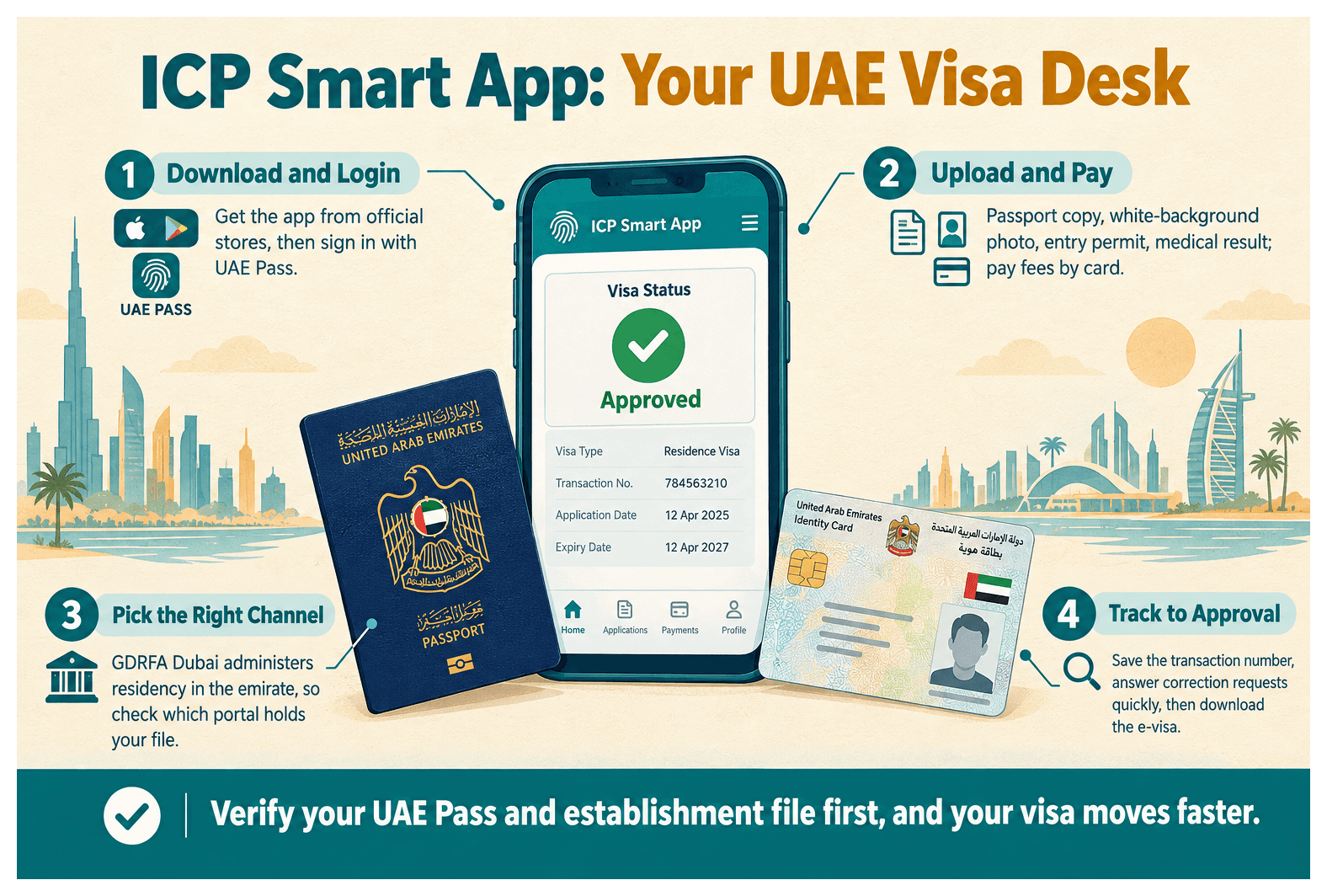
Download the ICP Smart App from the Apple App Store or Google Play, then sign in with UAE Pass. Confirm your mobile number and Emirates ID details, and your dashboard shows the services linked to your profile.
Check the publisher is the Federal Authority.
Avoid lookalike apps.
Downloading and logging in is free.
You'll need a verified-level account. Over 10 million people use UAE Pass (UAE Government Portal, 2026), and our UAE Pass explainer covers upgrades. Fix mismatched phone numbers before you apply.
Step-by-Step Guide to What Is the ICP Smart App and How to Use It for UAE Visa Services
Log in with UAE Pass, choose the visa service, select your establishment file, upload documents, pay fees online, submit, then track the transaction to approval.
Step 1: Log In and Select the Service
Open the services tab.
Choose "New Residence Visa" under your company file.
Step 2: Upload Documents and Pay Fees
Passport copy, white-background photo, entry permit, medical result.
Scan passports clearly; blurred pages cause rejections.
Pay by card and keep the receipt. Fees vary, so check icp.gov.ae.
ICP Smart App Services at a Glance
Service | What You Can Do |
|---|---|
New residence visa application | Submit investor, partner or employee files with uploads |
Visa renewal and cancellation | Renew before expiry; cancel when staff leave |
Emirates ID issuance and renewal | Apply, renew and update details after passport changes |
Entry permit requests | Request permits for visiting staff |
Status inquiry and document printing | Track files and print e-visa or digital ID copies |
Step 3: Submit, Track and Collect Approval
Save the transaction number.
Answer correction requests quickly.
Download the e-visa; see visa stamping status tracking.
Core Visa and Emirates ID Services Inside the App
The app handles residence visas, renewals, cancellations, Emirates ID, entry permits and document printing. Availability depends on your emirate, so confirm which authority holds your file.
A partner can renew a two-year visa before the grace period starts. A digital Emirates ID also works at a bank during account opening.
ICP Versus GDRFA Dubai: Which Channel Handles Your Visa File
ICP oversees federal identity and residency records, while GDRFA Dubai administers residency in the emirate. Check which portal holds your file before paying fees.
Why does the portal say my company isn't found?
Your establishment file probably isn't registered. Set it up right after license issuance and keep license details consistent. Our establishment file guide explains how. One founder fixed this before reapplying and the investor visa moved.
Business Owner Tasks That Rely on the App
Owners use the app to manage investor and staff visas, renew Emirates IDs and keep records aligned with MOHRE labour requirements. A three-person startup can watch every expiry date in one place.
Name mismatch between passport and Emirates ID: correct, then resubmit.
Expired UAE Pass verification: re-verify first.
Unpaid fees leave files pending.
Late renewal can trigger daily fines, so check current rates on official portals.
Linking the App to Your Dubai South Business Hub Visa Package
A Dubai South Business Hub Free Zone license comes with a residency visa package. Once your file is active, you can follow each transaction using what you now know about the ICP Smart App and UAE visa services.
The order runs license, establishment file, visa application, then medical and biometrics. Quota depends on your license and office arrangement, and timelines vary by nationality. Read how to apply for a residence visa.
Prepare your passport, photo and UAE Pass.
Ask which portal holds your file.
Confirm your visa allocation before hiring.
Your Next Step
Set up UAE Pass, confirm the right portal, and track every transaction to approval. Speak with Dubai South Business Hub to form your Free Zone company and activate your residency visa package.
References
Frequently Asked Questions