Topic Summary
UAE Visas Are Now Fully Electronic
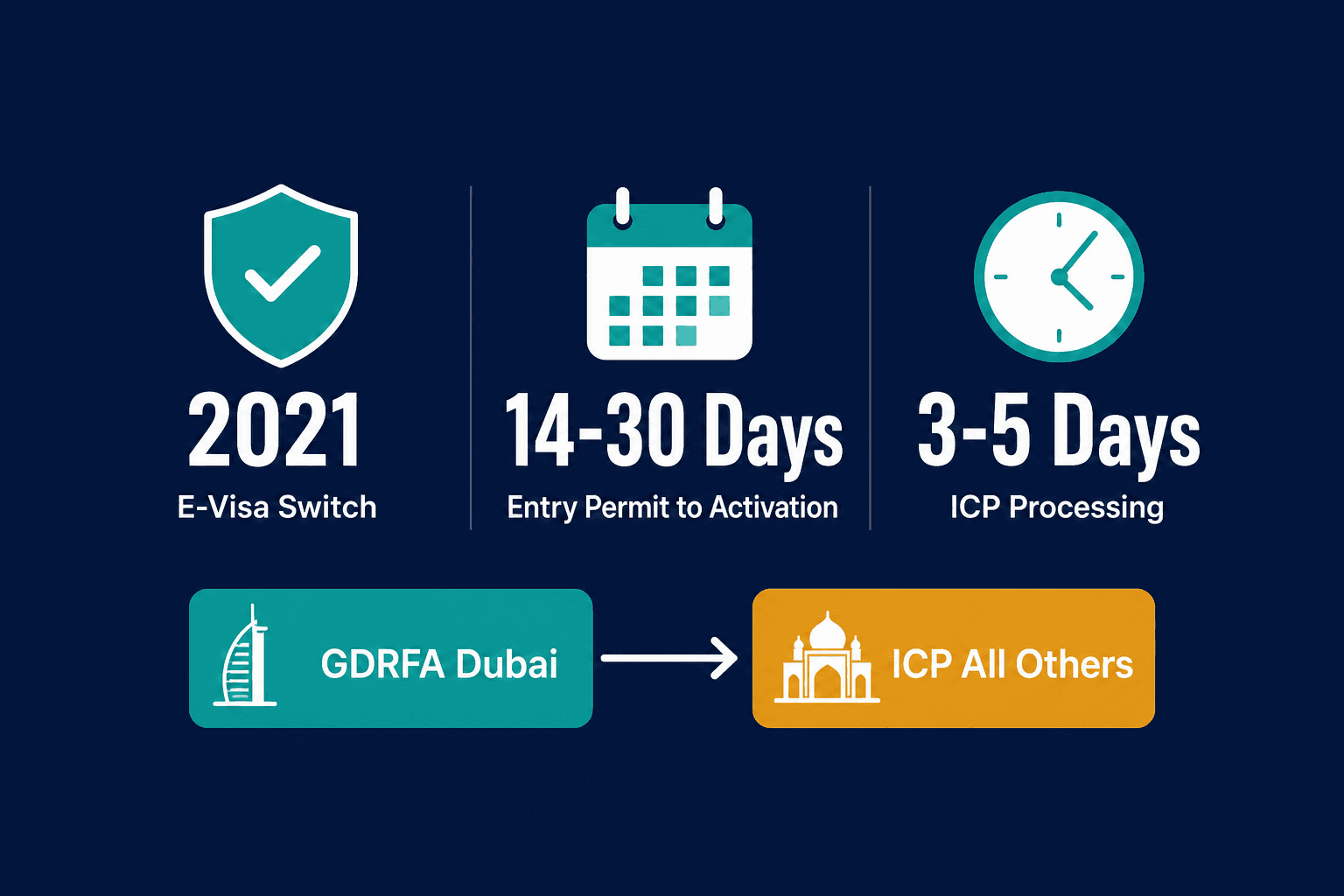
Since 2021, the UAE stores residence visa records in the ICP federal database rather than printing foil stickers in passports. Your visa is legally valid without any physical stamp under current UAE federal regulations.
Use the Right Portal for Your Emirate
Dubai-sponsored visas must be tracked through GDRFA at gdrfad.gov.ae, while all other emirates use ICP Smart Services at icp.gov.ae. Using the wrong portal will simply return no results for your application.
Expect 14 to 30 Days End-to-End
The full residence visa process, from entry permit issuance to e-visa activation, typically takes 14 to 30 calendar days. Standard ICP processing in Abu Dhabi and the Northern Emirates runs 3 to 5 working days once documents are accepted.
GDRFA Dubai Sends Automatic SMS Updates
Dubai applicants receive automated SMS notifications at each key status change, so you don't need to check the portal manually. Keeping your registered mobile number current ensures you don't miss critical updates.
Your Emirates ID Serves as Proof of Status
Once your visa is active, your Emirates ID card or a printed e-visa from the ICP portal serves as official proof of your residence status. No passport sticker is needed for the visa to be recognised legally.
Physical Stamps Are Still Available on Request
Certain cases, including visit visas converted in-country and some diplomatic categories, can still receive a physical passport endorsement. Residents who need a sticker for a foreign embassy visa appointment can request one at an ICP service centre.
Contact Authorities After 5 Stalled Working Days
If your visa stamping status has not progressed for more than 5 working days after a completed step, call ICP on 600 522222 or GDRFA Dubai on 800 5111. Acting promptly helps avoid delays that could affect your legal residency timeline.
The UAE processes hundreds of thousands of residence visa applications every year, yet one of the most persistent queries from expats remains the same: why is there no physical stamp in my passport, and how do I confirm my visa is actually active? The answer is that the UAE shifted almost entirely to electronic visas from 2021 onwards (ICP, 2023), meaning your visa record is stored in the federal database, not printed on a page. Emirates ID card issuance now runs at over 1.1 million cards annually (ICP, 2024), reflecting just how many residents go through this process each year. Standard ICP processing for residence visas in Abu Dhabi and the Northern Emirates runs 3 to 5 working days once documents are accepted. GDRFA Dubai sends automated SMS notifications at each key status change. The full end-to-end window, from entry permit to e-visa activation, is typically 14 to 30 calendar days.
This guide explains what visa stamping status UAE means in the current electronic environment, which portal to use based on your emirate, what each status message tells you, realistic timelines at every stage, and exactly what to do if your status has not moved.
What Is Visa Stamping in the UAE and Has the Process Changed
Visa stamping in the UAE refers to the official endorsement that activates a residence visa. Since 2023, the UAE has moved almost entirely to electronic visas: your visa record lives in the ICP database, not in your passport. A physical sticker stamp is rarely issued unless you specifically request one.
What 'Stamping' Actually Means Today
Traditionally, "stamping" meant a foil sticker placed directly into your passport by an ICA or GDRFA officer, confirming your residence visa was live. That process is largely gone. Since the UAE's shift to e-visa infrastructure, your visa is attached to your Emirates ID and passport number in the ICP (Identity and Citizenship Authority) system. No sticker is required for the visa to be legally valid under current UAE federal regulations (u.ae, 2024).
So when people ask about their visa stamping status UAE today, they're really asking: "Has my residence visa been issued and linked to my passport number in the federal database?" That's the check you need to run, and you can do it in minutes online.
Old process: Physical foil sticker in passport, issued at an ICA or GDRFA service centre
Current process: E-visa record created in ICP system, linked to passport number and Emirates ID
Proof of status: Emirates ID card or printed e-visa from the ICP portal
Worth flagging: many free zones and employers still use the word "stamping" informally to describe the entire visa activation process, including Emirates ID issuance. A new joiner at a Dubai company might complete their entry permit, medical, and Emirates ID biometrics and hear their HR team say they've been "stamped", even though no physical sticker was placed in their passport. The visa is confirmed via an ICP status check instead.
When a Physical Stamp Is Still Issued
Certain categories can still receive a physical endorsement on request: visit visas converted in-country, some diplomatic categories, and legacy renewal cases. If you're travelling to a country whose embassy requires a physical visa sticker for a visa appointment, you can visit an ICP service centre and request a passport endorsement. The fee for this service is UNVERIFIED: <fee>. Confirm before publishing.
For most residents, though, showing your Emirates ID at UAE border control or printing your e-visa directly from the ICP Smart Services portal is legally sufficient. You don't need a sticker to re-enter the UAE or to prove your residence status. For more on how the visa issuance process works end-to-end, see our guide to UAE residency visa services at Dubai South Business Hub Free Zone.
How to Check Visa Stamping Status UAE on ICP Smart Services
Residents in all emirates except Dubai use the ICP Smart Services portal at icp.gov.ae to check visa stamping status. Enter your passport number, nationality, and date of birth to retrieve your current visa record. The result confirms whether your residence visa is issued, under processing, or pending further action.
ICP vs GDRFA Dubai: Which Portal to Use for Visa Stamping Status
Feature | ICP Smart Services (icp.gov.ae) | GDRFA Dubai (gdrfad.gov.ae) |
|---|---|---|
Emirates covered | Abu Dhabi, Sharjah, Ajman, Ras Al Khaimah, Fujairah, Umm Al Quwain | Dubai only |
Lookup inputs required | Passport number + nationality + date of birth | Application or file number (passport number also accepted) |
Status message language | Application Received / Under Processing / Visa Issued / Rejected | Under Study / Approved / Stamping in Progress / Ready for Collection / Rejected |
Contact centre number | 600 522222 | 800 5111 |
Physical stamp requests | Available at ICP service centres on request | Available via GDRFA service centres; status shows 'Ready for Collection' when prepared |
Step 1: Access the ICP Portal and Enter Your Details
Navigate to icp.gov.ae and select ICP Smart Services.
Choose Visa Enquiry or Residence Visa Status from the services menu.
Enter your passport number, nationality, and date of birth exactly as they appear on your travel document.
Double-check the passport number, the system is case-sensitive.
Submit. No UAE Pass login or account registration is needed for a basic status enquiry.
The portal is accessible 24/7 and works on the ICP UAE app (available on iOS and Android), so you can run a visa stamping check from your phone in under two minutes. An expat in Abu Dhabi whose employer submitted a residence visa application two weeks prior can use this to confirm the status has moved from 'Under Processing' to 'Visa Issued' before booking their Emirates ID biometrics appointment.
Step 2: Read Your Status Message and What It Means
Application Received: The file is logged. No officer review has started yet.
Under Processing: An ICP officer is reviewing the application. Normal, can last several working days.
Additional Documents Required: Action needed. Check the portal message and contact your PRO or employer immediately.
Visa Issued: The residence visa is active in the federal database. Your Emirates ID appointment can proceed.
Rejected: The application was declined. A reason code is usually displayed; an appeal or reapplication may be possible.
Most residence visa applications in Abu Dhabi and the Northern Emirates are processed within 3 to 5 working days once all documents are accepted. Status updates on ICP are not always real-time, allow up to 24 hours after a known action before rechecking. A newly hired nurse in Sharjah who sees 'Additional Documents Required' three days after submission might find her PRO identifies a DHA health certificate reference number entered incorrectly, correcting it resolves the hold within 48 hours.
How to Check Visa Stamping Status UAE via GDRFA Dubai
Dubai-sponsored residence visas are managed by GDRFA Dubai, not ICP. Use the GDRFA website at gdrfad.gov.ae or the GDRFA Dubai app to check passport stamping status. Enter your file or application number to retrieve the current stage. GDRFA statuses differ slightly in wording from ICP but follow the same processing logic.
Which Emirate Uses Which Portal
Dubai-sponsored visas:gdrfad.gov.ae, covers mainland Dubai companies, Dubai free zone entities with GDRFA-linked processing, and Dubai family sponsorships.
All other emirates (Abu Dhabi, Sharjah, Ajman, Ras Al Khaimah, Fujairah, Umm Al Quwain): icp.gov.ae.
If you're unsure which authority processed your visa, check your original entry permit or ask your employer's PRO. The sponsor's emirate determines the portal. Some Dubai free zones route applications through ICP directly, when in doubt, try both portals with your passport number. A marketing manager sponsored by a Dubai mainland company checks gdrfad.gov.ae, while her colleague sponsored by an Abu Dhabi company checks icp.gov.ae. Both are tracking their residence visa stamping status UAE, just through different systems.
Using the GDRFA Dubai App and Website
Download the GDRFA Dubai app from the App Store or Google Play, or visit gdrfad.gov.ae.
Select Visa Services, then Application Status.
Enter your application or file number, this appears on any receipt your employer's PRO received at submission.
Read your status message.
GDRFA status messages include: Under Study, Approved, Stamping in Progress, Ready for Collection (for physical stamp requests), and Rejected. Worth noting: 'Stamping in Progress' does not always mean a physical sticker is being prepared, it typically means the e-visa is being finalised in the system. GDRFA Dubai also sends automated SMS notifications to the applicant's registered mobile number at key status changes, so you may receive a message before you even check the app. A logistics supervisor in Dubai whose visa was submitted via a typing centre might receive that SMS, check the app, and find his e-visa is already downloadable, no service centre visit required.
Realistic Visa Stamping Timeline: What to Expect at Each Stage
A UAE residence visa stamping timeline typically runs 7 to 15 working days from entry permit issuance to e-visa activation, assuming medical and Emirates ID steps complete without delays. Knowing the expected duration for each step lets you flag genuine hold-ups early.
Stage-by-Stage Timeline Breakdown
Entry permit issued: Day 0. The clock starts here. The applicant can now enter the UAE or change status inside the country.
Medical fitness test: Days 1 to 3. Results are typically uploaded to the ICP or GDRFA system the same day or the next working day.
Emirates ID biometrics: Days 2 to 5 after medical clearance. An appointment is usually available within this window once the medical result is linked in the system.
Visa stamping / e-visa activation: 3 to 7 working days after biometrics. ICP or GDRFA activates the residence visa in the federal database.
Emirates ID card delivery: 10 to 14 working days after biometrics, delivered to the registered address via Emirates Post.
A product manager joining a Dubai South company might complete her medical on day 2, biometrics on day 6, and receive her e-visa activation SMS on day 11, well within the standard window. Total typical window: 14 to 30 calendar days.
Factors That Can Slow Your Visa Stamping Status
Document errors at submission: A mismatched name spelling between passport and employer records is one of the most common causes of delay.
Medical result holds: Certain conditions flag for additional health authority review. The applicant is notified and given a window to resolve.
System queues during peak periods:January and September see higher volumes as companies complete annual workforce renewals.
Emirates ID appointment backlog: During busy periods, biometrics slots can be booked out 5 to 10 working days ahead.
Sponsor compliance issues: If the sponsoring entity has an outstanding MOHRE or ICP compliance issue, new visa applications may be paused.
A finance team processing 20 renewals in January may find Emirates ID appointments are booked out for 8 working days, pushing the entire cohort's activation timeline back by nearly two weeks. Plan for this during peak months.
What to Do When Your Visa Stamping Status Has Not Moved
If your visa stamping status UAE has not changed for more than 5 working days after a completed step, start with the ICP or GDRFA enquiry line. Check first that all upstream steps, medical clearance, Emirates ID biometrics, are confirmed complete. Most static statuses resolve through a targeted call or typed query, not a re-submission.
How to Escalate a Stalled Application: Five Steps
Step 1: Confirm the upstream step is genuinely complete. Medical results and Emirates ID biometrics must both be registered in the system before the visa can activate. Call the medical centre or check the ICA biometrics confirmation SMS.
Step 2: Recheck the portal after a full 24-hour gap. Status updates are sometimes delayed by up to one business day.
Step 3: Call the relevant contact centre. ICP: 600 522222 (Abu Dhabi and Northern Emirates). GDRFA Dubai: 800 5111.
Step 4: Visit a typing centre or ICP service centre with your original documents and request a manual status enquiry. They can access additional detail not visible on the public portal.
Step 5: If the status shows 'Additional Documents Required', your PRO or employer must re-submit the flagged document within the stated window to avoid the application lapsing.
In practice, an HR manager whose employee's ICP status has been stuck on 'Under Processing' for 7 working days might call 600 522222, quote the application file number, and be told the medical result was uploaded under a slightly different passport number variant. The correction is made and the visa activates the following day.
When to Request a Formal Status Report
If the application has been static for more than 10 working days with no system explanation, request a formal written status report from ICP or GDRFA at a service centre. Bring:
Original passport
Emirates ID (if held)
Original entry permit or acknowledgement receipt
Letter from the employer if the visa is employment-sponsored
References
gdrfad.gov.ae (gdrfad.gov.ae)
icp.gov.ae (icp.gov.ae)
u.ae (u.ae)
Frequently Asked Questions