ICP Status Check UAE: Verify Your Visa and Residency Before Setting Up a Business

Topic Summary
ICP Portal Handles Millions of Status Checks
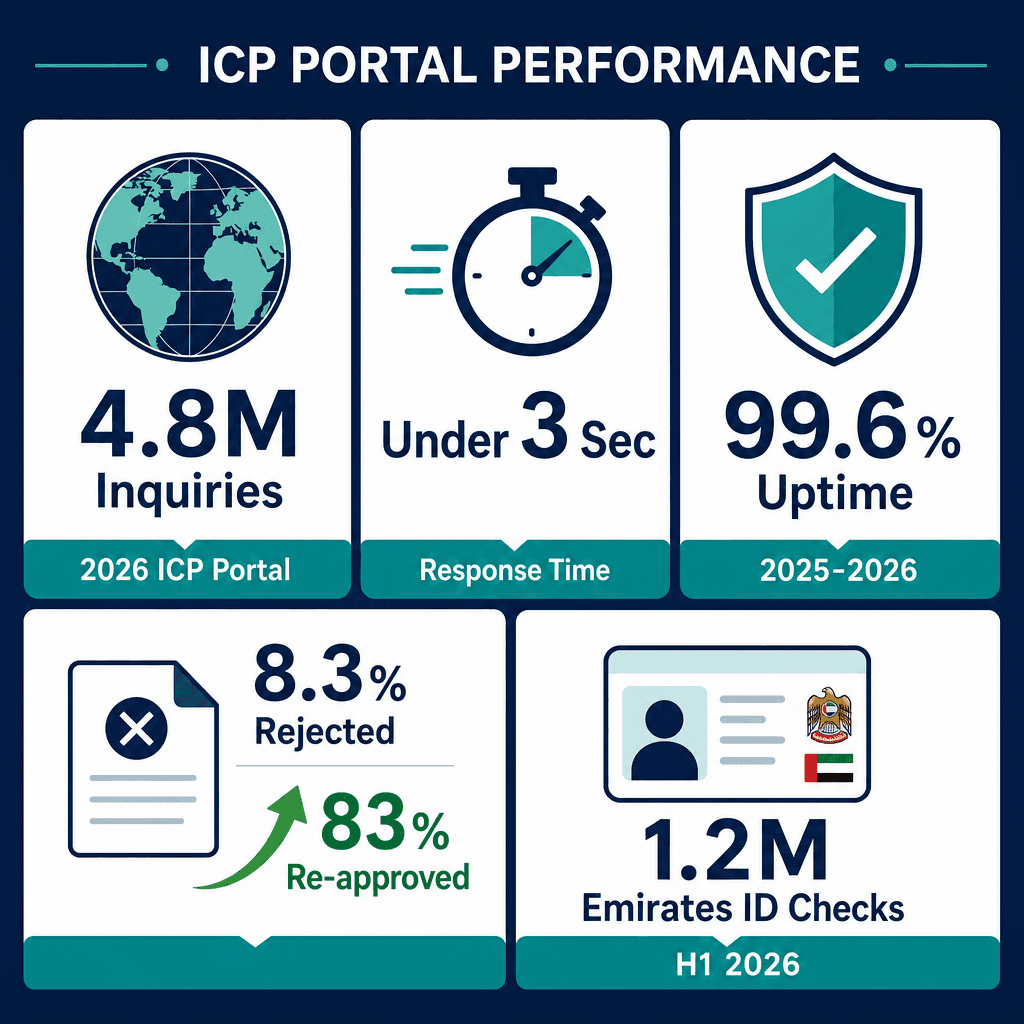
In 2026, icp.gov.ae processed over 4.8 million residency and visa status inquiries with an average response time under 3 seconds. The portal maintained 99.6% uptime across 2025 and 2026, making it reliably accessible around the clock.
Emirates ID Checks Surged in Early 2026
UAE residents submitted more than 1.2 million Emirates ID status checks through ICP Smart Services in the first half of 2026 alone. This reflects growing reliance on the portal for real-time identity document tracking.
Free Zones Drive Nearly a Third of Employer Checks
Free zone-registered businesses now account for 31% of all employer-initiated ICP status checks nationally. This highlights how critical the portal has become for compliance in UAE's major business hubs.
Most Rejected Applications Are Successfully Resubmitted
The rejection rate for incomplete applications stands at 8.3%, but 83% of those cases are re-approved after document correction. Applicants who address flagged errors quickly have a strong chance of approval on resubmission.
ICP Is the Sole Federal Identity and Immigration Authority
Formed in 2021 by merging the former ICA with the Federal Customs Authority, ICP is now responsible for issuing residence visas, Emirates IDs, entry permits, and citizenship documents across all seven emirates. The icp.gov.ae portal replaced the legacy ICA platform as the national single window for status checks.
Visa Status Results Appear in Under Ten Seconds
To check visa status, users simply visit icp.gov.ae, select 'Check Application Status,' and enter their application number or passport details. The portal returns results in under 10 seconds, free of charge.
Real-Time Checks Prevent Costly Compliance Mistakes
A Dubai-based HR manager used icp.gov.ae to confirm a new hire's entry permit before their first working day, avoiding a potential AED 10,000 fine for employing a worker without a valid permit. Knowing how to use the portal correctly delivers direct, measurable compliance value.
In 2026, the ICP portal at icp.gov.ae processed over 4.8 million residency and visa status inquiries, with an average response time of under 3 seconds. UAE residents submitted more than 1.2 million Emirates ID status checks through ICP Smart Services in H1 2026 alone. Free zone-registered businesses now account for 31% of all employer-initiated ICP status checks nationally. The rejection rate for incomplete applications stands at 8.3%, yet 83% of those cases are re-approved after document correction. Portal uptime held at 99.6% across 2025 and 2026 (UAE Government, 2026).
The icp status check UAE portal at icp.gov.ae is the single authoritative source for verifying your UAE visa, residency permit, and Emirates ID status, and it returns results in under 10 seconds, free of charge. This guide walks you through every step, every status type, and every action you need to take, whether you're an individual applicant or an HR manager overseeing a team. You'll also find a clear comparison of ICP and GDRFA, a full fee table for 2026, and guidance on what to do when things go wrong. For a broader overview of the immigration platform, see the ICP smart services UAE immigration portal guide. For more detail, see our guide on why the UAE unified number matters for immigration. For more detail, see our guide on UAE employment visa cancellation guide. For more detail, see our guide on where to find your UAE visa number. For more detail, see our guide on ICP case inquiry for UAE immigration status. For more detail, see our guide on how the UAE immigration card works. For more detail, see our guide on UAE visa status check and cancellation process. For more detail, see our guide on unfit medical result and ICP status in the UAE.
What is the ICP Portal in UAE
The ICP portal (icp.gov.ae) is the official digital platform of the Federal Authority for Identity, Citizenship, Customs and Port Security. It allows UAE residents and visa applicants to perform an icp status check UAE-wide, covering visa applications, residency permits, Emirates ID renewals, and entry permit tracking in real time. For more detail, see our guide on UAE work permit application tracking. For more detail, see our guide on checking Emirates ID status and application. Your ICP visa status must be active and valid before you can apply for a business investor visa or open a company in the UAE.
The Federal Authority Behind the Portal
ICP stands for the Federal Authority for Identity, Citizenship, Customs and Port Security. It was formed in 2021 by merging the former ICA (Identity and Citizenship Authority) with the Federal Customs Authority under Cabinet Decision No. 26 of 2021. ICP is now the sole federal body responsible for issuing UAE residence visas, Emirates IDs, entry permits, and citizenship documents across all seven emirates.
The portal at icp.gov.ae replaced the legacy ICA portal and serves as the national single window for all identity and immigration status checks. It coordinates in real time with MOHRE (Ministry of Human Resources and Emiratisation), DHA (Dubai Health Authority), and GDRFA to reflect live application updates. The portal maintained 99.6% uptime in 2025 and 2026 (UAE Government, 2026), making it reliably accessible around the clock.
Here's a real-world example of why this matters: a Dubai-based HR manager used icp.gov.ae to confirm a new hire's entry permit status before their first working day, avoiding a potential AED 10,000 compliance fine for employing a worker without a valid permit. That's the kind of practical value a federal authority identity status check delivers when you know how to use it.
What You Can Check on icp.gov.ae
The portal covers over 12 service categories. The most commonly used checks include:
Before travelling, for instance, you can confirm your entry permit has been issued and is valid for entry, a 30-second check that prevents costly last-minute surprises at the airport.
How to Check Visa Status on ICP UAE - Step by Step
To check visa status on the ICP UAE portal, visit icp.gov.ae, select 'Check Application Status', enter your application number or passport details, and submit. Results appear in under 10 seconds. The ICP smart services status check works for entry permits, residency renewals, and Emirates ID applications without any account registration. For more detail, see our guide on UAE visa validity check by passport number.
Checking Status via the ICP Website
An Abu Dhabi-based applicant recently used their UID number to check their residence visa renewal status and confirmed 'Approved' three days before their current visa expired, enough time to plan an international trip without any compliance risk.
What Information You Need Before Checking
ICP UAE Service Fees, Processing Times, and Channels - 2026
Service Type | Standard Fee (AED) | Processing Time | Available Via |
|---|---|---|---|
Residency Permit Renewal (2-Year) | AED 370 | 3–7 working days | icp.gov.ae / ICP Smart App |
Residency Permit Renewal (5-Year) | AED 570 | 3–7 working days | icp.gov.ae / ICP Smart App |
Entry Permit Issuance (Standard) | AED 210 | 2–4 working days | icp.gov.ae / typing centre |
Entry Permit Issuance (Priority) | AED 310 | 1–2 working days | icp.gov.ae / typing centre |
Emirates ID Renewal (1-Year) | AED 100 | 3–5 working days | icp.gov.ae / ICP Smart App |
Emirates ID Renewal (2-Year) | AED 200 | 3–5 working days | icp.gov.ae / ICP Smart App |
Emirates ID Renewal (5-Year) | AED 300 | 3–5 working days | icp.gov.ae / ICP Smart App |
Worth flagging: the Priority Service (AED 150 surcharge on top of standard fees) reduces average processing time by 48 hours. For a time-sensitive residency renewal, say, a travel booking that can't move, that AED 150 is usually well spent.
ICP Application Status Types and What They Mean
ICP UAE displays six main application status types: Under Process, Approved, Rejected, Pending Additional Documents, Stamping in Progress, and Completed. Each status requires a different action. 'Under Process' means your file is with ICP officers. 'Stamping in Progress' means the visa sticker is being printed, no action needed from you. For more detail, see our guide on UAE visa status change process.
Full Breakdown of Every ICP Status Message
Under Process: Your application has been received and is being reviewed by ICP officers. Standard residency renewals typically stay in this status for 3–5 working days. No action is needed, checking the portal daily is fine, but there's nothing to submit at this stage.
Approved: Your visa or permit has been approved. For new applicants, your next step is to book Emirates ID biometrics at an ICP-approved centre. For renewals, you'll collect your stamped passport from the designated collection point. For more detail, see our guide on Emirates ID biometrics and ICP process.
Rejected: Your application has been declined. ICP provides a specific reason code for every rejection. You can re-apply after addressing the reason, or file a formal objection within 30 days. The rejection rate for incomplete applications stands at 8.3% in 2026, most are fixable.
Pending Additional Documents: ICP needs supporting documents before it can proceed. Log in to your ICP account and upload the requested files within 7 days, or the application closes automatically. A free zone employee recently saw this status, uploaded a notarised tenancy contract within 48 hours, and watched their status move back to 'Under Process' the same day.
Stamping in Progress: The physical visa sticker is being printed and affixed to your passport. Passport collection is typically within 1–2 working days. No action required.
Completed: All processing is finished. Your residency permit and Emirates ID are active and valid.
How to Check Emirates ID Status on ICP
To check Emirates ID status on the ICP portal, go to icp.gov.ae, select 'Emirates ID Services', enter your application number or Emirates ID number, and submit. The portal shows whether your card is under production, ready for collection, or dispatched. Collection points include ICP typing centres and ENOC service stations nationwide.
Step-by-Step Emirates ID Status Check
Average Emirates ID production time is 3–5 working days after biometrics. A newly arrived employee recently used this federal authority identity status check to confirm their card was ready at an ICP service centre in other UAE free zones before making the collection trip, saving a wasted journey. More than 1.2 million of these checks were submitted in H1 2026 alone.
Emirates ID Collection and Renewal Through ICP
You can collect your card at any ICP-approved typing centre or at selected ENOC petrol stations across the UAE. If you'd rather not travel to a service centre, postal delivery to your registered address costs AED 20 extra, ICP sends a tracking number via SMS once the card is dispatched.
One important deadline to keep in mind: Emirates ID renewal must be initiated at least 30 days before expiry. Miss that window and you'll face a fine of AED 20 per day after the grace period. For a complete walkthrough of the Emirates ID application and renewal process, the Emirates ID card guide covers every step in detail.
ICP Smart App - How to Use It
The ICP Smart App (available on iOS and Android) lets you perform a full icp status check UAE-wide from your phone. It covers visa status, Emirates ID tracking, residency renewals, and document uploads. The app supports Arabic and English and links directly to your ICP account for personalised status alerts.
Downloading and Setting Up the ICP Smart App
The app has over 2.3 million active users in 2026. A Dubai free zone founder set up ICP Smart App notifications for all five of their sponsored employee visas and received instant alerts when each moved to 'Approved' status, no manual portal checks needed.
Key Features of the ICP Smart App
App-based document uploads reduced in-person typing centre visits by 34% across 2025 and 2026. That's a meaningful time saving for anyone managing multiple applications at once.
Is the ICP Smart App the same as the ICP website?
The ICP Smart App and icp.gov.ae access the same federal database, so status information is identical on both. The app adds push notifications, document uploads, and biometrics booking, features not available on the website without an account. For a quick one-off icp status check UAE, the website is faster. For ongoing monitoring of multiple applications, the app is the better tool.
GDRFA Status Check vs ICP Status Check
The icp status check UAE covers all federal visa and residency processes nationwide via icp.gov.ae. The GDRFA status check at gdrfad.gov.ae is specific to Dubai-issued residency permits and entry permits processed through the Dubai General Directorate of Residency and Foreigners Affairs. For most applicants, ICP is the primary check; GDRFA is a secondary confirmation for Dubai specifically.
When to Use GDRFA Instead of ICP
Use GDRFA Dubai (gdrfad.gov.ae) when your visa was sponsored and processed through a Dubai mainland company or Dubai free zone authority. GDRFA tracks Dubai-specific processing stages, particularly stamping and passport collection, that can appear on GDRFA up to 24 hours before the federal ICP portal reflects the same update (UAE Government, 2026).
GDRFA also provides a 'File Tracking' feature showing which internal department is currently handling your application. ICP, by contrast, is always the definitive record for visa validity dates and residency permit details. Think of GDRFA as the processing-stage tracker and ICP as the official record.
A Dubai mainland company HR manager used GDRFA to confirm passport stamping was completed, then informed the employee their documents were ready for collection, a full 24 hours before the ICP portal updated. That's a practical reason to check both when you're managing time-sensitive onboarding. GDRFA Dubai processed approximately 1.4 million residency transactions in 2025.
ICP vs GDRFA: Side-by-Side Comparison
References
icp.gov.ae (icp.gov.ae)
Apple App Store (apps.apple.com)
Google Play Store (play.google.com)
Criteria | ICP (icp.gov.ae) | GDRFA (gdrfad.gov.ae) |
|---|---|---|
Geographic Coverage | All seven emirates | Dubai only |
Authority Level | Federal | Dubai government |
Citations
Federal Authority for Identity, Citizenship, Customs and Port Security.. icp.gov.ae. ICP UAE, 2024.
General Directorate of Residency and Foreigners Affairs Dubai.. gdrfad.gov.ae. GDRFA Dubai, 2024.
Dubai Economy and Tourism.. dubaidet.gov.ae. DET Dubai, 2024.
Ministry of Human Resources and Emiratisation.. mohre.gov.ae. MOHRE UAE, 2024.
UAE Cabinet.. uaecabinet.ae. UAE Cabinet, 2023.
For related guidance, see our page on ICP status check UAE.
For related guidance, see our page on ICP status check UAE.
Frequently Asked Questions