Topic Summary
What Is a Tax Invoice and Why Free Zone Companies Must Issue a Correct Tax Invoice in the UAE
A tax invoice records a taxable supply and shows the VAT charged. It lets your customer reclaim input tax. To issue a correct tax invoice in the UAE, it must carry every detail the VAT Executive Regulation requires.
Mandatory Details You Need to Issue a Correct Tax Invoice in the UAE
Mandatory Details You Need to Issue a Correct Tax Invoice in the UAE
Step-by-Step Walkthrough to Issue a Correct Tax Invoice in the UAE
To issue a correct tax invoice in the UAE, confirm registration, set the VAT rate, choose the format, complete every field, issue within 14 days, and retain the record for five years.
Free Zone, Mainland, and Export Invoicing Scenarios
VAT treatment depends on the supply and the zone status, not just your free zone license. Confirm Designated Zone status against the FTA list.
Common Mistakes, Penalties, and Record Retention Rules
Frequent errors include missing TRNs, wrong rates, and broken numbering. The FTA can impose administrative penalties and deny input tax recovery. Keep records at least five years.
Preparing Your Invoicing for UAE E-Invoicing
The UAE is rolling out mandatory e-invoicing for VAT-registered businesses. Use software that produces structured data and check Ministry of Finance announcements for phase dates.
Your Next Step
To issue a correct tax invoice in the UAE, confirm your TRN, apply the right VAT rate, complete every field, number sequentially, issue within 14 days, and keep records five years. Review your template against the field list this week, and speak to Dubai South Business Hub about setting up your free zone company with compliant accounting.
More than 350,000 businesses are VAT-registered in the UAE (Federal Tax Authority, 2025), and each must meet one invoicing standard. This guide helps free zone owners and finance managers issue a correct tax invoice in the UAE, from mandatory fields to deadlines and records.
What Is a Tax Invoice and Why Free Zone Companies Must Issue a Correct Tax Invoice in the UAE
A tax invoice records a taxable supply and shows the VAT charged. It lets your customer reclaim input tax. To issue a correct tax invoice in the UAE, it must carry every detail the VAT Executive Regulation requires.
Tax Invoice Defined Under UAE VAT Law
The standard VAT rate is 5%, and qualifying supplies are taxed at 0%. Say a Dubai South free zone consultancy bills a mainland client AED 20,000 for services. The invoice must show AED 1,000 VAT. Credit notes follow similar content rules when a supply is reduced or cancelled.
Full Tax Invoice vs Simplified Tax Invoice in the UAE
Feature | Full Tax Invoice | Simplified Tax Invoice |
|---|---|---|
Typical customer type | VAT-registered business customers (B2B) | Unregistered customers and retail buyers |
Customer name, address and TRN required | Yes, including the customer TRN if registered | No customer details needed |
Value limit | No limit | Low-value supplies up to AED 10,000 |
Line-item detail | Quantity, unit price, discount, taxable amount, VAT per line | Description, date, and tax amount |
Issue deadline | Within 14 days of supply | Within 14 days of supply |
Why Accuracy Protects Your Input Tax Recovery
Customers recover input VAT only when the invoice meets the legal content rules. Imagine a client rejecting your invoice because your TRN is missing. Payment stalls until you reissue it. Our guide on tax invoice requirements in the UAE covers the wider rules.
Mandatory Details You Need to Issue a Correct Tax Invoice in the UAE
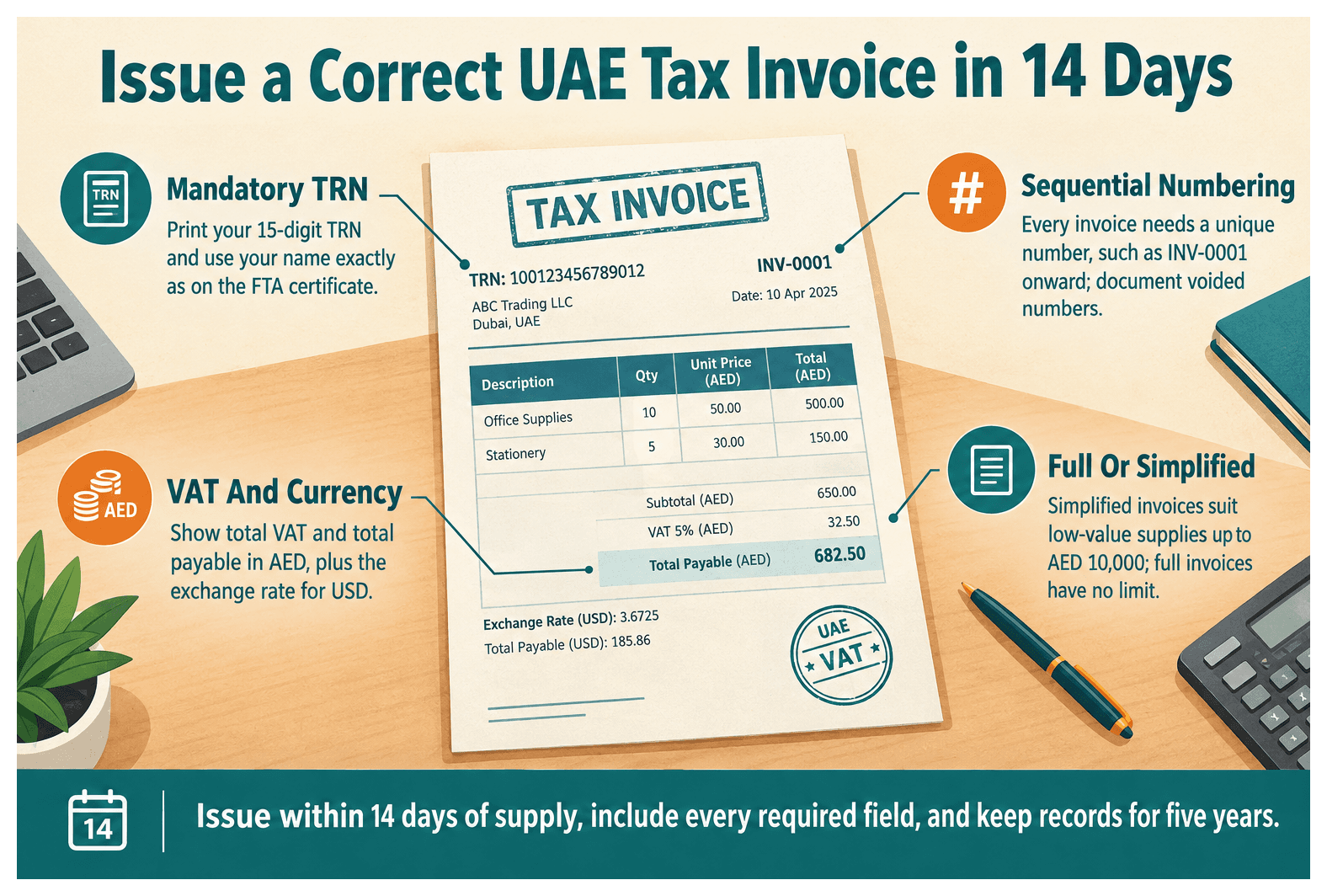
A UAE tax invoice must show the words "Tax Invoice", supplier and customer details, your TRN, a unique sequential number, dates, item descriptions, VAT rate and amount, and totals in AED (Ministry of Finance, VAT Executive Regulation).
Supplier, Customer, and TRN Details
Show "Tax Invoice" at the top.
Use your name and address exactly as on the FTA certificate.
Print your 15-digit TRN.
Add the customer's name, address, and TRN if registered.
Watch for name mismatches. One trading company used its trade license name on contracts but a short name on invoices, which clashed with its TRN certificate.
Line Items, VAT Amounts, and Currency Rules
List description, quantity, unit price, and discount.
Show the taxable amount and VAT rate.
Show total VAT and total payable in AED.
For USD or EUR invoices, state the exchange rate used.
Sequential Numbering and Dates
Every invoice needs a unique sequential number, such as INV-0001 onward. Document voided numbers rather than deleting them. Show the issue date and the supply date if different. See tax invoice numbering requirements in the UAE for formats.
Step-by-Step Walkthrough to Issue a Correct Tax Invoice in the UAE
To issue a correct tax invoice in the UAE, confirm registration, set the VAT rate, choose the format, complete every field, issue within 14 days, and retain the record for five years.
Step 1: Confirm Your TRN and Determine the Supply Type
Check your TRN status on EmaraTax.
Classify the supply: standard, zero-rated, exempt, or outside scope.
Test the place of supply, for example a service to a UK client.
Step 2: Choose Between a Full and a Simplified Tax Invoice
Use a full invoice for registered B2B customers.
Use a simplified invoice for unregistered buyers or supplies up to AED 10,000.
Step 3: Complete Every Field and Check the Maths
Lock mandatory fields in your accounting template.
Cross-check line VAT against total VAT.
Add payment terms and bank details.
Step 4: Issue Within the Deadline and Record It
Issue within 14 days of supply. A project completed on 5 March needs an invoice dated by 19 March. Post it to your ledger so it flows into your return, as explained in VAT return filing for Dubai companies.
Free Zone, Mainland, and Export Invoicing Scenarios
VAT treatment depends on the supply and the zone status, not just your free zone license. Confirm Designated Zone status against the FTA list.
Invoicing Mainland Clients From a Free Zone Company
Services to mainland clients are typically standard-rated. A consultancy billing AED 50,000 charges AED 2,500 VAT on its tax invoice. Check your license covers the activity, and read whether a free zone company can invoice UAE mainland clients.
Zero-Rated Exports and Designated Zone Supplies
Qualifying exports can be zero-rated, but you must keep evidence. Show 0% and the reason on the invoice. For goods, see commercial invoice for UAE exports.
Common Mistakes, Penalties, and Record Retention Rules
Frequent errors include missing TRNs, wrong rates, and broken numbering. The FTA can impose administrative penalties and deny input tax recovery. Keep records at least five years.
Errors That Trigger Rejections and Fines
Missing TRN or "Tax Invoice" label.
No AED totals.
5% applied to zero-rated supplies, or the reverse.
Editing a sent invoice instead of issuing a credit note.
Retention Periods and Audit Readiness
Store invoices and credit notes in a tamper-evident, retrievable format. Cloud-archived PDFs can answer an audit request in a day. Details are in tax invoice retention period in the UAE.
Preparing Your Invoicing for UAE E-Invoicing
The UAE is rolling out mandatory e-invoicing for VAT-registered businesses. Use software that produces structured data and check Ministry of Finance announcements for phase dates.
Clean legal names, addresses, and TRNs.
Standardise templates.
Assign a quarterly reviewer to sample 20 invoices.
Your Next Step
To issue a correct tax invoice in the UAE, confirm your TRN, apply the right VAT rate, complete every field, number sequentially, issue within 14 days, and keep records five years. Review your template against the field list this week, and speak to Dubai South Business Hub about setting up your free zone company with compliant accounting.
References
Frequently Asked Questions