
Topic Summary
What Is WPS Payroll and How to Process Payroll Correctly Under WPS in Dubai
WPS payroll is the electronic salary system overseen by MOHRE and the Central Bank of the UAE. Employers pay through approved banks or exchange houses, and each payment is recorded. To process payroll correctly under WPS in Dubai, pay the full agreed salary on time through a registered channel.
Legal Requirements Behind WPS Payroll for Free Zone Employers
Legal Requirements Behind WPS Payroll for Free Zone Employers
Step-by-Step Guide to Process Payroll Correctly Under WPS in Dubai
To process payroll correctly under WPS in Dubai: confirm employee records, calculate net pay, generate the SIF, submit through your bank or exchange house, confirm acceptance, and archive proof. Finish before the due date each month.
Setting Up Your Payroll Foundation Before the First Salary Run
Before the first salary run, a free zone employer needs an active trade license, an establishment file, work permits, a corporate bank account, and WPS registration. Doing this first prevents rejected files. See WPS registration and compliance for detail.
Common WPS Payroll Mistakes and How to Fix Them
Common WPS errors include wrong bank details, mismatched labour card numbers, late submission, partial payments, and unrecorded deductions. Validate data before each run, submit early, reconcile confirmations, and correct rejected records immediately.
How to Monitor WPS Compliance and Choose Payroll Support
Monitor WPS compliance by checking status after every run, reconciling payments to the SIF, and reviewing MOHRE notices. If in-house capacity is thin, use a WPS-compliant payroll provider for file creation, submission and records.
Your Next Step
To process payroll correctly under WPS in Dubai, build the foundation first, then repeat a monthly cycle: verify, calculate, generate the SIF, submit early, confirm and archive. Review your workflow against the four steps above, run a WPS status check this month, and speak with Dubai South Business Hub about license and visa packages.
More than 5.5 million private-sector workers are paid through the Wage Protection System [1]. Over 95% of private-sector employers must use it [1]. Repeat violations can cost up to AED 50,000 [1]. MOHRE handles over 2.3 million WPS file submissions monthly, and 450,000+ establishments are registered [1]. This guide shows free zone employers and HR managers how to process payroll correctly under WPS in Dubai, so you can run a compliant cycle next month.
What Is WPS Payroll and How to Process Payroll Correctly Under WPS in Dubai
WPS payroll is the electronic salary system overseen by MOHRE and the Central Bank of the UAE. Employers pay through approved banks or exchange houses, and each payment is recorded. To process payroll correctly under WPS in Dubai, pay the full agreed salary on time through a registered channel.
How the Wage Protection System Works
Picture a 12-person Dubai South consultancy paying salaries on the 28th through its corporate bank. The Salary Information File (SIF) links each employee's labour card number, contract data and payment. The Central Bank of the UAE and MOHRE then monitor whether payment landed on time.
Why Correct Processing Matters for Free Zone Employers
Late or mismatched payments trigger flags.
Non-compliance can freeze new work permits.
Clean records help visa renewals and bank reviews.
One employer used outdated bank details in the SIF. The payment was flagged and a permit request was blocked.
Legal Requirements Behind WPS Payroll for Free Zone Employers
Federal Decree-Law No. 33 of 2021 requires employers to pay wages on time, in UAE dirhams, and in full. MOHRE enforces this through WPS monitoring. Free zone employers with MOHRE-linked work permits carry the same duties and must keep payment records. The new UAE salary rule is worth reading too.
What the Decree-Law Says About Wages
Wages are paid in AED within the legal window after the due date. Deductions are limited by law, and you must keep wage records. A salary due on the 30th but paid on the 12th of the next month falls outside the grace period, and that counts as a violation.
Penalties and Escalation for Non-Compliance
Fines escalate for repeat or multi-employee delays.
Work permit freezes hit new applications.
Repeated flags can bring inspection visits.
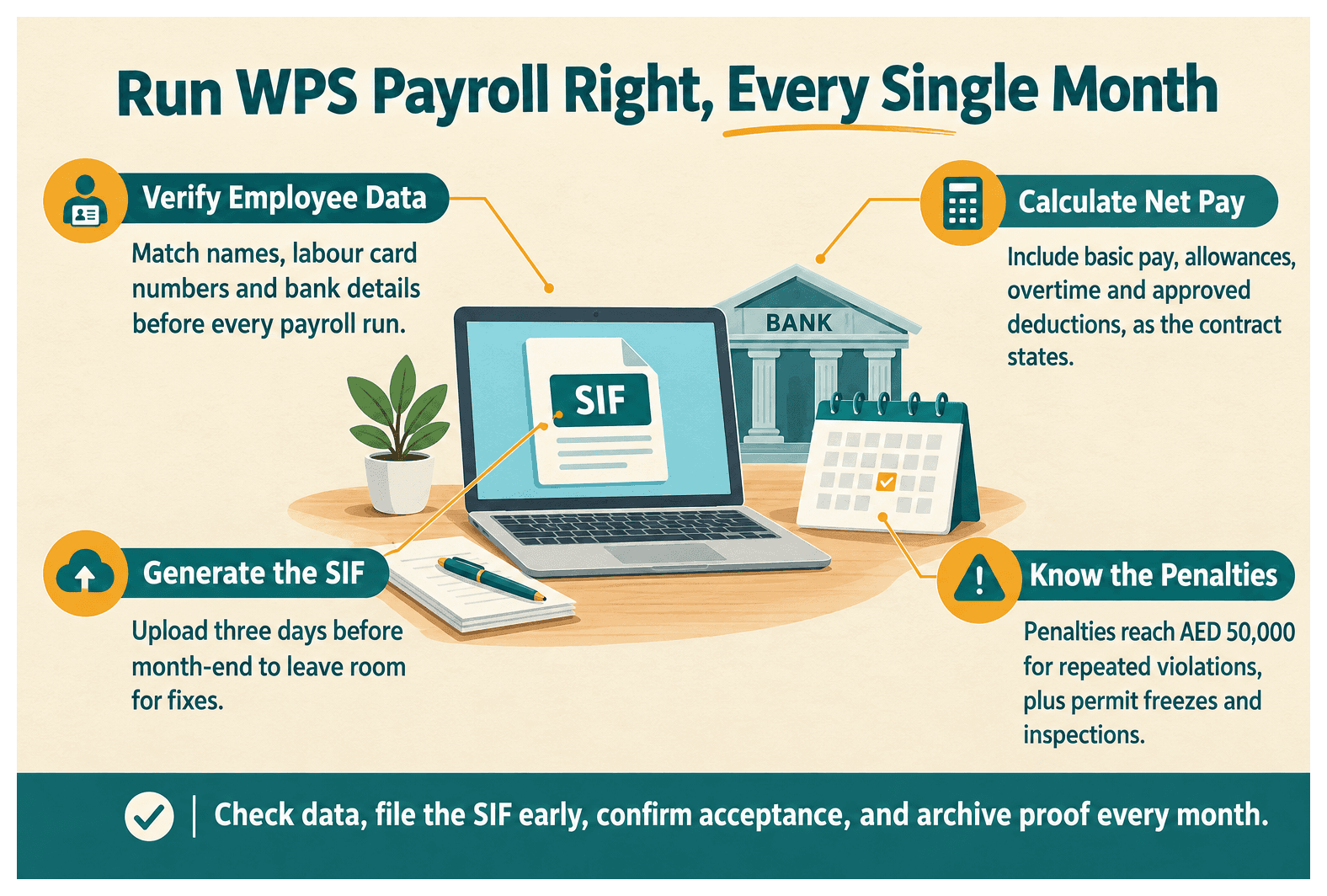
Penalties reach AED 50,000 for repeated violations.
Three consecutive late runs? Expect a permit freeze and an inspection.
Step-by-Step Guide to Process Payroll Correctly Under WPS in Dubai
To process payroll correctly under WPS in Dubai: confirm employee records, calculate net pay, generate the SIF, submit through your bank or exchange house, confirm acceptance, and archive proof. Finish before the due date each month.
Step 1: Verify Employee and Contract Data
Match names, labour card numbers and bank details.
Confirm contract salary components.
Update joiners and leavers.
One HR manager spotted a changed IBAN before the run and avoided a rejected transfer.
Step 2: Calculate Net Pay Accurately
Include basic pay, allowances, overtime and approved deductions.
Document leave and unpaid-day adjustments.
Keep payslips consistent with the contract.
If an employee has a AED 2,000 housing allowance, it goes in the file as contracted.
Step 3: Generate the SIF and Submit Payment
Create the SIF in your payroll software or bank portal, then check for validation errors. Upload three days before month-end to leave room for fixes.
Step 4: Confirm Acceptance and Archive Records
Check the bank's confirmation. Store the SIF, payslips and transfer proof. Save a PDF and run a UAE WPS status check on the 1st of each month.
Setting Up Your Payroll Foundation Before the First Salary Run
Before the first salary run, a free zone employer needs an active trade license, an establishment file, work permits, a corporate bank account, and WPS registration. Doing this first prevents rejected files. See WPS registration and compliance for detail.
License, Visas and Establishment Records
You need an active Dubai South Business Hub free zone license and residency visas tied to it. A new Dubai South company should confirm visa and labour card numbers before sending its first SIF.
Bank Accounts and WPS Registration
Open a corporate account with a WPS-enabled bank.
Register with an approved exchange house or bank.
Pilot with two employees before onboarding ten more.
WPS Payroll Mistakes, Consequences and Fixes
Feature | Mistake | Recommended Fix |
|---|---|---|
Wrong IBAN or bank details | Transfer is rejected or flagged, and a permit request can be blocked. | Re-confirm bank details before every run. |
Labour card number mismatch | One typo delays an employee's pay by five days. | Validate IDs against the establishment file. |
Late SIF submission | Payment lands outside the legal window and counts as a violation. | Upload three days before month-end. |
Undocumented deductions | A fine deducted without written grounds invites a complaint. | Record the legal basis and get written notice. |
No post-run status check | Flags go unseen until a permit freeze. | Check status on the first working day monthly. |
Common WPS Payroll Mistakes and How to Fix Them
Common WPS errors include wrong bank details, mismatched labour card numbers, late submission, partial payments, and unrecorded deductions. Validate data before each run, submit early, reconcile confirmations, and correct rejected records immediately.
Data and File Errors
Incorrect IBANs and routing codes.
Labour card mismatches.
Wrong salary components in the SIF.
Timing and Deduction Errors
Submitting on the due date leaves no buffer. Deductions need a documented basis, and end-of-service or leave payouts shouldn't be ignored.
Resolving Disputes Before They Escalate
Pay the undisputed salary on time and log the overtime disagreement separately. Keep written communication. If it escalates, know the route for a labour dispute in Dubai.
How to Monitor WPS Compliance and Choose Payroll Support
Monitor WPS compliance by checking status after every run, reconciling payments to the SIF, and reviewing MOHRE notices. If in-house capacity is thin, use a WPS-compliant payroll provider for file creation, submission and records.
Running Regular WPS Status Checks
Schedule a review on the first working day of each month. Reconcile the payroll register to bank confirmations and act on MOHRE alerts quickly.
When to Outsource Payroll Processing
Headcount is growing or pay components are multiplying.
You lack in-house payroll expertise.
You want unified payments, such as TotalPay WPS payroll solutions.
A 40-person company moved to a WPS-compliant provider to cut manual file errors.
Your Next Step
To process payroll correctly under WPS in Dubai, build the foundation first, then repeat a monthly cycle: verify, calculate, generate the SIF, submit early, confirm and archive. Review your workflow against the four steps above, run a WPS status check this month, and speak with Dubai South Business Hub about license and visa packages.
References
Frequently Asked Questions